Inspiring
July 13, 2015
Answered

Index to bookmark in topic

  • July 13, 2015
  • 1 reply
  • 904 views

I'm using RH2015

I have a fairly long topic. About 3/4 of way down is a topic bookmark called "Sales Tax Calculation". If I click on the TOC entry in HTML 5 online help, it takes me to that location in the page.

If I create an index entry, it takes me to the start of the page and user has to scroll way down. If I select Cross reference and select the bookmark (not sure if this is the right hing to do). the index entry disappears when i regenerate

so how do I get the index to take the user to a specific location in the page/topic?

TIA

Mark

This topic has been closed for replies.
Correct answer Captiv8r

Hi Mark

Cross Reference is not what you want here.

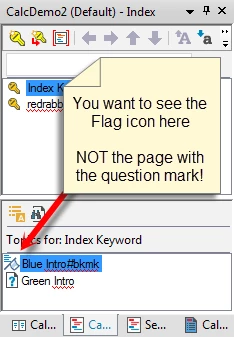
I suppose there could always be a bug that was missed, but generally speaking, you *SHOULD* be able to simply ensure the bookmark is added to the "Topics For" area. From what you have described, it sounds as if you linked the TOPIC and not the Bookmark.

Cheers... Rick

1 reply

Captiv8r
Captiv8rCorrect answer
Legend
July 13, 2015

Hi Mark

Cross Reference is not what you want here.

I suppose there could always be a bug that was missed, but generally speaking, you *SHOULD* be able to simply ensure the bookmark is added to the "Topics For" area. From what you have described, it sounds as if you linked the TOPIC and not the Bookmark.

Cheers... Rick

Inspiring
July 14, 2015

Thanks. screen shot helped.

I can now correctly link to a TOC location

last issue is how to link to other things on page. In example below, I want to add an index entry for "Billing ZIP", but it's not a topic. How would I do that? I don;t see a way to make it a book mark or link an index entry to it

Captiv8r
Legend
July 14, 2015

Hello again

See if this quick and dirty video helps.

Click here to view

Cheers... Rick