
Index word exists but I don't see it
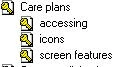
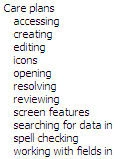
Hello: I'm using RH7. My index entries are saved in the topics. Viewing the Index tab, I don't see all my keywords and subkeywords, e.g., Care plans\creating. But when I view Topic Properties, Index, I see my index entry, e.g., Care plans\creating. When I generate the WebHelp, in some cases I do see all the subkeywords that I'm not seeing in the project (I've attached screen shots showing what I'm seeing in the project vs. the output for my care plans example). For other keywords, the output is all over the place--I don't see them at all; I see them but with only a few subkeywords; or I see them with all the subkeywords.
Because I couldn't see a word, I tried to add it but got the error that the keyword already existed. So I added the word with an extra character (e.g., Creating1) then tried to change the name to Creating. When it asked if I wanted to merge Creating1 with Creating, I said yes, hoping maybe that would force the word to show up, but no luck. I still cannot see it.
Any ideas as to what is up and how can I fix this so that I can add more subkeywords to keywords?
Thanks for your help!


 AdChoices