
Inspiring
October 29, 2018
Question

Indigo Layout

  • October 29, 2018
  • 1 reply
  • 489 views

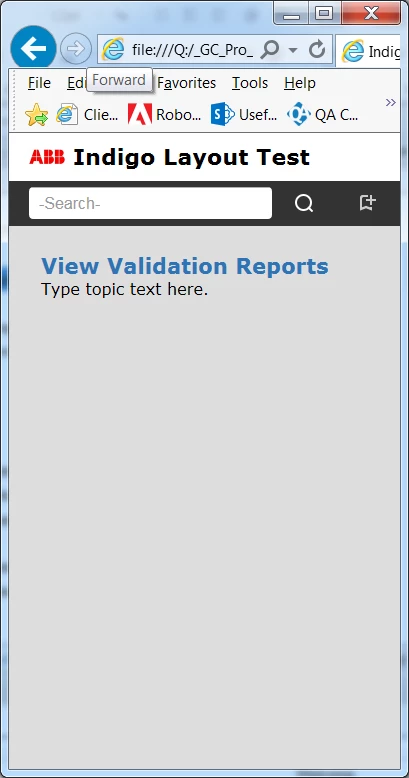
I'm testing the Indigo layout to see if we can use it. I really want the Favorites feature, and this is apparently the only layout that offers it. However, I don't understand this layout. If you view a topic in Mobile view, you can't go to the Table of Contents, Index or Glossary from that topic. You can't filter topics. You can only use Search and add the topic to your Favorites. There are no other icons, unless you switch to tablet view. This can't possibly be right, so I'm wondering what I'm doing wrong.

I've gone over the layout multiple times, and can't seem to locate where I would go to display these icons in mobile view. Could someone please point me in the right direction?
This topic has been closed for replies.

1 reply

Peter Grainge
Community Expert
Community Expert
October 29, 2018

You should be seeing a burger menu as below with access to the TOC etc

Try again without any customisation or putting in your own logo first. In the layout, select Indigo again and give it a slightly different name, Indigo2 will suffice.


See www.grainge.org for free RoboHelp and Authoring information.

@petergrainge

Use the menu (bottom right) to mark the Best Answer or Highlight particularly useful replies. Found the answer elsewhere? Share it here.
Inspiring
October 29, 2018

The icon is white, and I set a white background so I couldn't see it. I knew it was something like that. Thanks!

Peter Grainge
Community Expert
Community Expert
October 29, 2018

We've all done it or something similar.


See www.grainge.org for free RoboHelp and Authoring information.

@petergrainge

Use the menu (bottom right) to mark the Best Answer or Highlight particularly useful replies. Found the answer elsewhere? Share it here.