


Known Participant
Aug 7, 2017 10:19 AM UTC
Answered

Indigo layout index has keywords and subkeywords at same level

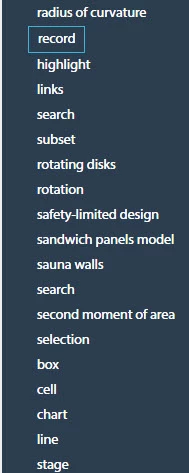
I'm using the Indigo HTML 5 layout in RH2017. The index in my help project contains keywords and subkeywords. However, the subkeywords are listed at the same level as the keyword. This causes the index to look like it's in non-alphabetical order, because it's not clear to the user which are keywords or subkeywords.

Here is a screenshot with the Indigo layout:
And here is the same index in a CHM output. The subkeywords are at a different level.
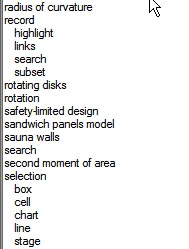
Is there a way to reproduce the CHM-style nesting of the index with the Indigo layout?

This topic is closed to new replies. Start a new post to keep the conversation going.
vivek_kCorrect answer
Adobe Employee
Aug 8, 2017 4:28 PM UTC

Please click the link below and add your vote if you find this problem.

Tracker


See www.grainge.org for RoboHelp and Authoring information

@petergrainge


Hi stewic, thanks for filing the issue.

This issue is there in RH 2017 Update 1, we are working on it and update 2 shall be out soon later this month.

Thanks,

Vivek

20 replies

techwriter_sj
Participating Frequently
Sep 13, 2017 7:06 PM UTC

Hi Stewic,

Did the update 2 for RoboHelp 2017 fix the problem for you? I just installed the update and regenerated...my index is still not indenting for the Indigo layout.

Translate
Peter Grainge
Community Expert
Community Expert
Sep 13, 2017 7:23 PM UTC

You have to import the layout again. It does not correct things in your

existing layout.

Translate
Use the menu (bottom right) to mark the Best Answer or Highlight particularly useful replies. Found the answer elsewhere? Share it here.
techwriter_sj
Participating Frequently
Sep 13, 2017 7:58 PM UTC

I'm sorry Peter, I'm not following when you say "you have to import the layout again." I tried creating a new HTML5 Indigo layout but that didn't do the trick.

Translate
Peter Grainge
Community Expert
Community Expert
Aug 7, 2017 11:10 AM UTC

Please see the thread at How to control fomatting used on WebHelp Index tab?

I will lock this thread to keep all the answers in one thread. Post there if what is there does not help.


See www.grainge.org for RoboHelp and Authoring information

@petergrainge

Translate
Use the menu (bottom right) to mark the Best Answer or Highlight particularly useful replies. Found the answer elsewhere? Share it here.
Peter Grainge
Community Expert
Community Expert
Aug 7, 2017 11:14 AM UTC

I have unlocked this thread as there is a key difference, you are generating an HTML5 layout and the other thread is about WebHelp.

Nonetheless, check the other thread first. Also try importing the Indigo layout again and giving it a different name such as Indigo 2.

Post back to say solved or report that it is still an issue.


See www.grainge.org for RoboHelp and Authoring information

@petergrainge

Translate
Use the menu (bottom right) to mark the Best Answer or Highlight particularly useful replies. Found the answer elsewhere? Share it here.
stewicAuthor
Known Participant
Aug 7, 2017 11:35 AM UTC

I'm still having this issue. I've tried re-importing the layout, but no success. I'm seeing the issue when I use the Indigo layout with other RH projects too.

I can produce (non-HTML5) Webhelp that has the correct index indentation level.

Translate