


Sleant
Inspiring
November 9, 2021
Question

Inline Script - Custom Button

  • November 9, 2021
  • 4 replies
  • 596 views

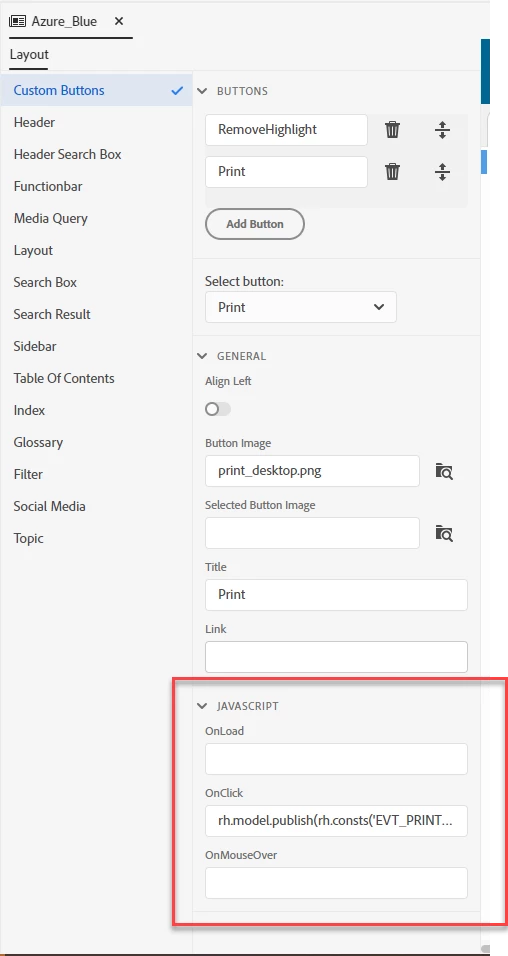
I'm using RH 2019 New UI version -  did RH remove the ability to edit the "inline script" when you're trying to insert inline JavaScript for a custom button like we used to have in version 2017? Thank you so much, everyone. Really appreciate it.
This topic has been closed for replies.

4 replies

Peter Grainge
Community Expert
Community Expert
November 11, 2021

Rick hasn't been active on the forums for a couple of years now.


If you save the script in the Assets folder, you can then right click on it and select Show In Explorer. Then you can open it from there in your text editor.


You could submit a Feature Request to be able to edit text files in the Author panel or open it in your default text editor. Please follow this link to report bugs or request new features. https://tracker.adobe.com. Post the link to your bug report / feature request in this thread and others can vote for it. The more people who do so, the higher it gets prioritised.

________________________________________________________
See www.grainge.org for free Authoring and RoboHelp Information

Use the menu (bottom right) to mark the Best Answer or Highlight particularly useful replies. Found the answer elsewhere? Share it here.
Peter Grainge
Community Expert
Community Expert
November 10, 2021

I suggest you submit a feature request. Please follow this link to report bugs or request new features. https://tracker.adobe.com. Post the link to your bug report / feature request in this thread and others can vote for it. The more people who do so, the higher it gets prioritised.

________________________________________________________
See www.grainge.org for free Authoring and RoboHelp Information

Use the menu (bottom right) to mark the Best Answer or Highlight particularly useful replies. Found the answer elsewhere? Share it here.
Sleant
SleantAuthor
Inspiring
November 10, 2021

As always, Peter. Thank you for your help in all my posts.

Community Expert
November 10, 2021

Sorry, in that case I can't help as I've never added a custom button in Classic. In New UI, you can type javascript in the field and that is all as far as I know.

Sleant
SleantAuthor
Inspiring
November 10, 2021

No worries at all. I always appreciate you, Amebr. I found this video that either you or Rick created (I'm not sure) and posted it in one of the posts in the past; and that's how I know we used to be able to do Inline JavaScript https://www.screencast.com/t/VFg7kxNB 

Community Expert
November 10, 2021

It would have been Rick most likely. 🙂

Community Expert
November 9, 2021

Once you've added your button, you then need to select it in the "Select button" list. That will change the options in the General and Javascript sections. Then you should be able to edit the onClick field for the selected button.

Sleant
SleantAuthor
Inspiring
November 9, 2021

Understood. I'm so sorry for the misleading screenshot. I know what you're talking about, but on the "OnClick" field when I added a new button and after I selected that button from the "Select button:" list, it doesn't allow inline javascript text block to open like we used to have in RH '17.