
Participating Frequently
September 22, 2014
Question

insert a captivate 7 HTML 5 output in Robohelp 10

  • September 22, 2014
  • 1 reply
  • 366 views

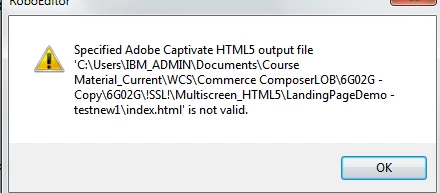
I am trying to insert a captivate 7 HTML 5 output in Robohelp 10. I tried the steps specified by adding an adobe captivate demo. I linked it to both the swf file and the index.html file. However I am getting an error, that the index.htm file is not valid. Can you please let me know the solution to this.
    This topic has been closed for replies.

    1 reply

    johndaigle
    Legend
    September 23, 2014

    Hi, MeeraPRV

    I recreated this error message and think I have the answer. When you used the Browse button to locate the HTML5 output file, I suspect you selected the wrong "index.htm" file.

    Instead, you should navigate to the Captivate HTML5 Output folder and select the index.html file in the same folder as the .swf Flash file.

    At this point, RoboHelp will create a new "zipped" file of all the Captivate output variations with the extension ".cpz" and place it in the "Baggage Files" folder. You don't have to do anything with that .cpz file. It will be automatically managed for you in the Multiscreen HTML5 SSL generation process.

    Also be sure to "tick" the "Use Adobe Captivate HTML5 output" Setting shown below.

    Lastly, be sure you apply the latest service update for RoboHelp 10.01 for good measure if you haven't already :-)

    John Daigle

    Adobe Certified RoboHelp and Captivate Instructor

    Evergreen, Colorado

    www.showmethedemo.com

    John DaigleAdobe Certified RoboHelp and Captivate InstructorNewport, Oregon
    Participating Frequently
    September 24, 2014

    Hi John,

    Thanks for the reply.

    I had in fact  selected the right file. In this case, LandingPageDemoTestnew1 is a folder which contains the swf file as well as the index. htm file of the captivate HTML 5 output. I had placed this folder within the MultiScreen_HTML 5 folder in Robohelp.

    I also tried the same by putting it in a different location.

    I also tried  removing the spaces and special characters in the path name to the file.

    I had the same result. in both instances.