
Participating Frequently
December 6, 2023
Answered

Installtion is not possible since the controls of the set-up.exe dialog are not reachable

  • December 6, 2023
  • 5 replies
  • 570 views

I'm trying to install the trial version of RoboHelp 2022.3.0, but the first dialog does not show all the contols. The dialog can also not be resized, so there is no way to install the product. I've tried it on two different machines with the screen resolution 1920x1080, but I'm not able to proceed.


Has anybody run into the same issue? Is there any way to resize this dialog?
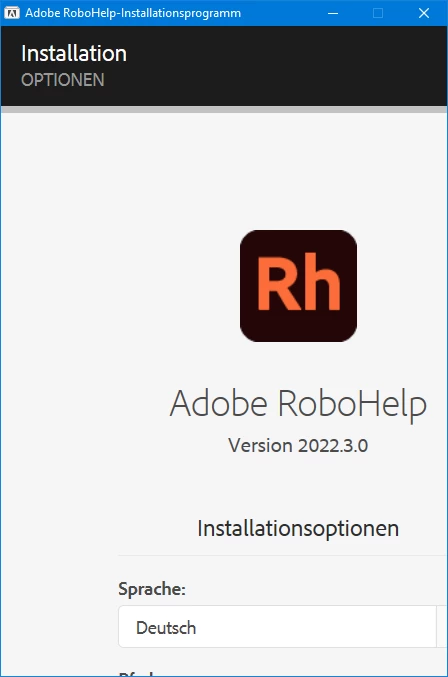
 

    This topic has been closed for replies.
    Correct answer Peter Grainge

    I have seen this issue and also seen someone else report it.


    With that dialog open, press the Tab key. I think it is twice. Then press Enter. You may or maynot see the button appear but it will work.

    ________________________________________________________

    My site www.grainge.org includes many free Authoring and RoboHelp resources that may be of help.


    5 replies

    Peter Grainge
    Community Expert
    Community Expert
    December 7, 2023

    I have spoken to the RoboHelp team and this is outside their direct control. It is a standard dialog used by all Adobe products. They will raise the issue with the team responsible for the dialog.


    Meantime, tab twice and press Enter. 🙂

    ________________________________________________________

    My site www.grainge.org includes many free Authoring and RoboHelp resources that may be of help.


    Use menu (bottom right) to mark as Best Answer or to Highlight particularly useful replies. Found the answer elsewhere? Share it here.
    Participating Frequently
    December 7, 2023

    Thanks for your help.

    Community Expert
    December 6, 2023

     It's possible the screen size has been coded for English and doesn't take into account the longer nature of German words, and I would consider that a bug. 🙂


    You can request features and report issues here: https://tracker.adobe.com/
    (You can also search in the issue tracker to see if it's been reported before, and upvote the previous report.)
    Post the item number in the discussion so people can easily vote if they want the same functionality.

    Participating Frequently
    December 7, 2023

    I've started Windows in english language, modified screen resolution, modified scaling, etc. nothing had any input.

    But due to the suggestion above simply click the tab twice and hit enter, I was able to overcome the issue. No need for further tips.

    Community Expert
    December 6, 2023

    Also, if it happens again, or someone else encounters it, check the Windows display settings and make sure the Scale and Layout text size setting is set to 100% (not 150% or 200%, etc). I can't say this is the cause, but it can cause weird display issues in programs that aren't programmed appropriately.

    Participating Frequently
    December 6, 2023

    This did not case the issue. The scaling was set to 100%.

    Peter Grainge
    Community Expert
    Peter GraingeCommunity ExpertCorrect answer
    Community Expert
    December 6, 2023

    I have seen this issue and also seen someone else report it.


    With that dialog open, press the Tab key. I think it is twice. Then press Enter. You may or maynot see the button appear but it will work.

    ________________________________________________________

    My site www.grainge.org includes many free Authoring and RoboHelp resources that may be of help.


    Use menu (bottom right) to mark as Best Answer or to Highlight particularly useful replies. Found the answer elsewhere? Share it here.
    Participating Frequently
    December 6, 2023

    Thank you. That helped to finish the installation.

    Jeff_Coatsworth
    Community Expert
    Community Expert
    December 6, 2023

    Haven't seen that before - have you tried just hitting enter to get it started (& you're running it as an Admin, right?). The field that's cut off is the standard c:\program files\ install location IIRC.

    Participating Frequently
    December 6, 2023

    Besides the location also any sort of "Ok" or "Apply" button is missing, so there is no chance to go on. I've tried it as an admin. It is also elevating the process correctly to the admin rights. I have tried it on a laptop, on a PC also I've tried it over a remote desktop. I've also tried to set the language to english, which makes the texts in the dialog appearing in english, but the layout still is the same.


    Is there any chance that this is an issue just occuring in 2022.3.0?

    Jeff_Coatsworth
    Community Expert
    Community Expert
    December 6, 2023

    Possibly - I'd give the RH crew a ping - see https://helpx.adobe.com/contact/enterprise-support.other.html#robohelp for your Adobe Support options. I'd recommend using the tcssup@adobe.com e-mail address as it reaches a team dedicated to Technical Communication Suite products including RoboHelp.
