Known Participant
January 26, 2020
Question

Internal Error Occurred. Failed to generate Printed Documentation.

  • January 26, 2020
  • 5 replies
  • 512 views

I am using Robohelp 2017 and updated to the latest version 13.0.2.334. I am using Word 2016. I am getting this error:
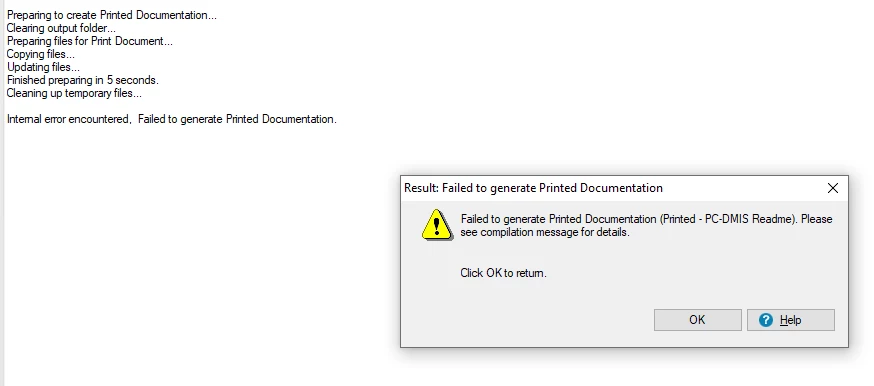


Can someone help, please?

 

This topic has been closed for replies.

5 replies

Peter Grainge
Community Expert
Community Expert
January 28, 2020

I think we have reached the point where you need to contact Adobe Support. techcomm@adobe.com or by phone.


I think there is some conflict in the registry that needs their database to fix.


Sorry I couldn't help you.


www.grainge.org

Use the menu (bottom right) to mark the Best Answer or Highlight particularly useful replies. Found the answer elsewhere? Share it here.
Peter Grainge
Community Expert
Community Expert
January 27, 2020

Also try in the new single topic project using default CSS rather than your own.


Use the menu (bottom right) to mark the Best Answer or Highlight particularly useful replies. Found the answer elsewhere? Share it here.
Known Participant
January 28, 2020

I tried source and output on same and different drives but same issue.


Windows 10.


With or Without Source COntrol. Its same error.


tried with a single topic project also but it displys run time error.

Peter Grainge
Community Expert
Community Expert
January 27, 2020

Source and output on same drive?


Version of Windows?


Any source control involved?


Use the menu (bottom right) to mark the Best Answer or Highlight particularly useful replies. Found the answer elsewhere? Share it here.
Peter Grainge
Community Expert
Community Expert
January 27, 2020

Have you tried both DOC and DOCX as output options? I doubt that is it but it is worth a try first.


Are you generating to the same drive as the project?


Was 2017 and the update applied by someone who had local admin rights?


I think I would try an uninstall, reboot and reinstall making sure you have local admin rights. If that is done by someone else who has those rights, make sure they open RoboHelp after installing and updating.


www.grainge.org

Use the menu (bottom right) to mark the Best Answer or Highlight particularly useful replies. Found the answer elsewhere? Share it here.
Known Participant
January 27, 2020

Yes, I tried both doc and .docx. Both displays same error.


Yes, I tried uninstall, reboot, and reinstall with admin rights. But, still I am facing the same issue.

Peter Grainge
Community Expert
Community Expert
January 26, 2020

Two things to try first.


  1. Generate an output with just one simple topic in it to see if you still get the same message.
  2. Generate one of the sample projects for the same reason.


That pinpoints whether the issue is with your project or is a general issue.


www.grainge.org

Use the menu (bottom right) to mark the Best Answer or Highlight particularly useful replies. Found the answer elsewhere? Share it here.
Known Participant
January 26, 2020

I tried with just one simple topic. It displayed the same error message.


When I tried with the sample project, it displayed this error message: