September 24, 2009
Question

Internet Explorer Script Error

  • September 24, 2009
  • 2 replies
  • 4980 views

Dear Experts,

After compiling the Microsoft HTML Help in RoboHelp (which runs through perfectly fine), when I try to view the output, I get the following error message when I click on some of the chapters (not on all):
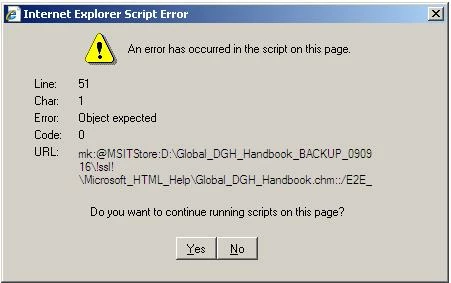
Interestingly, if I click yes, the message appears again, and after confirming the same message 2 or 3 times, the content of the page is displayed. Do you have any ideas how I can fix this?

Thanks in advance for your help!

André

This topic has been closed for replies.

2 replies

Known Participant
November 17, 2009

Andre,

Did you make any headway into this problem?

I too, am receiving the same system messages. And, like you, if I click through the messages, I eventually wind up in my help system.

Whilst working with a developer, we determined that the lines in the topic that were causing the problem were directly related to breadcrumbs and highlight search. When we commented those lines of code out, the messages no longer displayed. (And, once we got through those particular lines, we would get them in the next topic, followed by the next, etc.)

Great, I had a work-around. But that makes me nervous. These specific lines of code are auto-generated by Robohelp, so, in theory, they must be useful for something.

Peter Grainge recommended I do a search in the Troubleshooting Tips on the RH HTML forum and/or the HTML Help Forum. I haven't had any luck there yet.

10570Fan

Peter Grainge
Community Expert
Community Expert
November 17, 2009

Try this post.

http://forums.adobe.com/message/2227577#2227577


See www.grainge.org for RoboHelp and Authoring tips

Follow me @petergrainge

Use the menu (bottom right) to mark the Best Answer or Highlight particularly useful replies. Found the answer elsewhere? Share it here.
Known Participant
November 17, 2009

Thanks for your help, Peter.

We are going to try this and get back to you with our results.....

Noreen

September 24, 2009

I forgot to add, the only thing that changes in the error messages is the "line" number. Even after confirming the error message several times and then finally seeing the page content, the book itself still does not open, so you can't access the topics in the book.

RoboColum_n_
Legend
September 25, 2009

Does this error occur if the CHM is opened on more than one PC? If so, there may be something inside the topic that is causing this error. Look at the file shown in the message and see if there is anything untoward.

I did notice that the path is on the D: drive. Is this a network drive or a partition? If the former, try on your C: drive.


Read the RoboColum(n).

September 25, 2009

Dear Colum,

I have a compiled CHM version on my laptop and one on a server. A colleague of mine also has the same CHM on his laptop (we work with RoboSourc Control for joint development) and the error message appears on all 3 machines. Our laptops and the server are all partitioned with the "D" drive for data, i.e. documents & settings folder with the C-drive only used for the operating system as well as program and system files. Interestingly, on my laptop, RoboHelp is installed on C-drive with the project and output folders on the D-drive. Even if I copy the CHM file to the C-drive, this makes no difference at all, the error still appears. On the server, RoboHelp is installed to "D" and generates to "D", so all within the same partition... therefore, I don't think this is the reason.

Also, we don't have anything fancy on the topic pages other than an image with a couple of image maps + links to the content and a small script in the header and footer of the file generating a banner with hyperlinks in it as well as the file name and last change date. The scripts shouldn't be an issue, as they have worked unchanged in numerous other projects without any difficulties.