Known Participant
April 14, 2010
Question

Internet Explorer script error

  • April 14, 2010
  • 1 reply
  • 1284 views

Hello everyone,

I'm using RH for Word 7 with Word 2007 to generate a .chm. The file contains several links to the Web, and all of them work fine except one, and I can't figure out why. I've even copied and pasted the URL from the browser directly to the code for the link. I also copied/pasted a working link and edited it to be the one I want, but the errors persist. It occurs on every PC it runs on, with versions of IE from 6 through 8. In last year's version of the project, which was done with Word 2003, this did not occur. Any ideas?

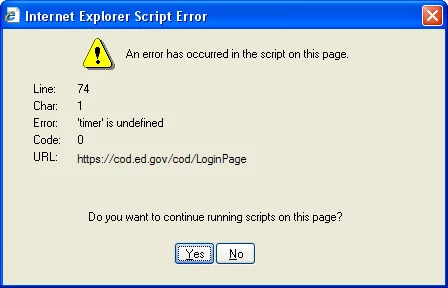
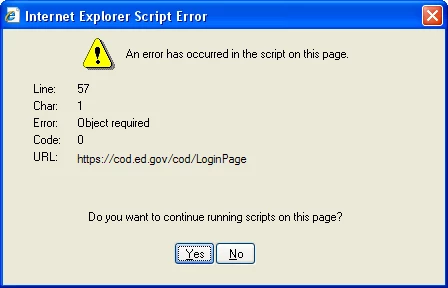
The error on the left occurs first. The one on the right appears with the next action (clicking Back, another topic, etc.).  !Inet("https://cod.ed.gov")Any ideas/A
Thanks!

Beth

This topic has been closed for replies.

1 reply

Peter Grainge
Community Expert
Community Expert
April 15, 2010

Create a new topic with no content except that link.

The error is indicating a script problem so in a clean topic it should not occur. That will be a step in solving the problem. Then you have to identify what script is causing the messages.


See www.grainge.org for RoboHelp and Authoring tips

@petergrainge

Use the menu (bottom right) to mark the Best Answer or Highlight particularly useful replies. Found the answer elsewhere? Share it here.
Known Participant
April 15, 2010

Hi Peter,

Another Internet link (different URL) in the same topic works. If the topic wasn't clean, wouldn't it have the same problem? I tried copying the topic text to Notepad and then back to Word in a new topic, but still the same result. It's strange to me that all of the cod.ed.gov links have this problem, yet none of the other links (such as fsadownload.ed.gov) do, even when they occur together in the same topic.

This is off the wall, but RoboHelp 7 and Word 2007 don't seem particularly well integrated--could that be an issue here? As I said, these links worked last year when I working in Word 2003, and there was no change to them from then to now.

Thanks for the reply. I'll keep trying, though I'm not sure what at this point.

Beth

Captiv8r
Legend
April 15, 2010

Hi Beth

To each his/her own, but...

You would likely have an easier time of things if you switched over to RoboHelp HTML. Particularly since your output is .CHM. Working with RoboHelp for Word is a bit like trying to be an alchemist. You are trying to make wine out of water.

And when you run up against things such as this you find that it becomes a crap shoot as to sorting why it's happening and how to fix it.

Cheers... Rick

Helpful and Handy Links

RoboHelp Wish Form/Bug Reporting Form

Begin learning RoboHelp HTML 7 or 8 within the day - $24.95!

Adobe Certified RoboHelp HTML Training

SorcerStone Blog

RoboHelp eBooks