


Inspiring
June 5, 2024
Question

Is auto-numbering broken (again)?

  • June 5, 2024
  • 6 replies
  • 691 views

Do not have the option to reset the number value in an auto-numbered paragraph. Option appears to be missing in the content properties.
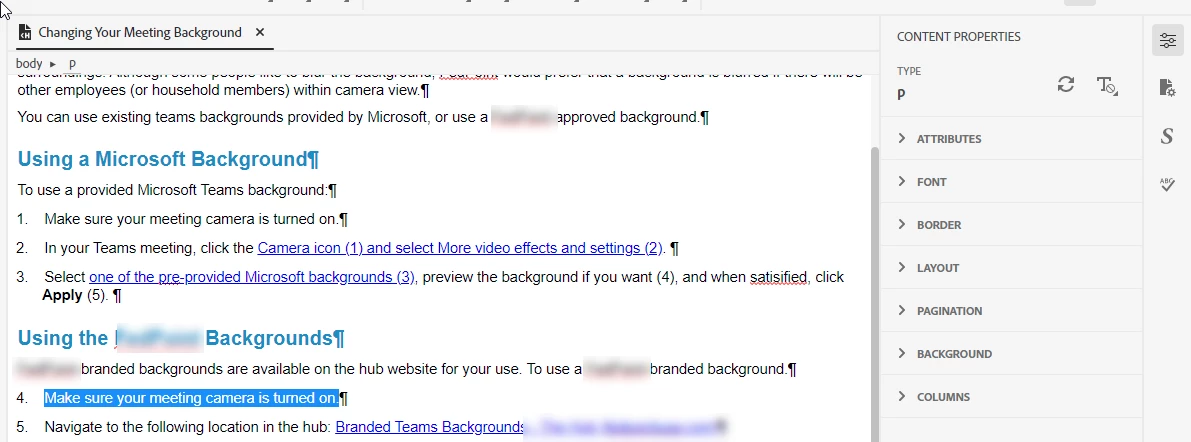
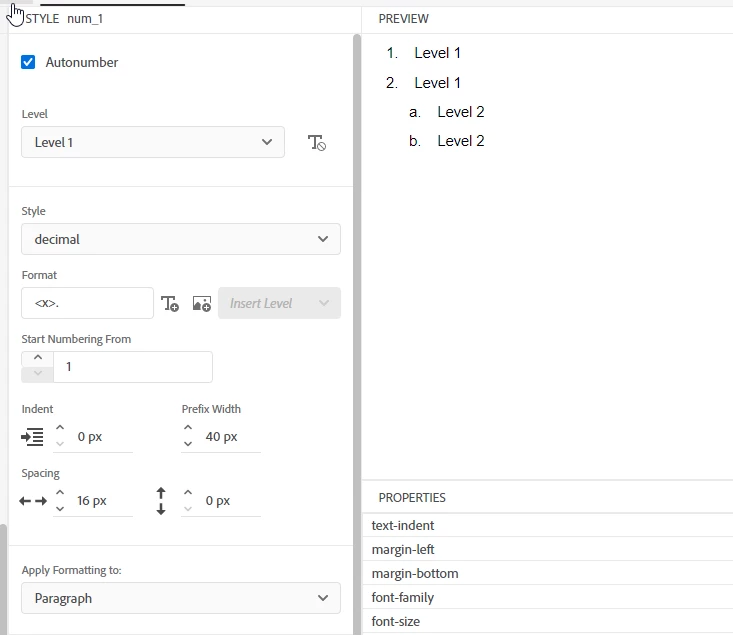


I am pretty sure it was available in last release. Seems broken (AGAIN) in latest version. Not sure why this is so damned hard for the development team to figure out.


Version 2022.4.179

    This topic has been closed for replies.

    6 replies

    Peter Grainge
    Community Expert
    Community Expert
    June 6, 2024

    Adobe have confirmed this will be fixed in the next update but I cannot give you a date for that.

    ________________________________________________________

    My site www.grainge.org includes many free Authoring and RoboHelp resources that may be of help.


    Use menu (bottom right) to mark as Best Answer or to Highlight particularly useful replies. Found the answer elsewhere? Share it here.
    Inspiring
    June 6, 2024

    Peter - Thank you for confirming and following through to report the bug. I already have my css set up for multiple (long) projects, and would rather not have to change to list styles and confirm correct application of styles. Also, being a long-time robohelp user on- and- off through the years (back to Blue Sky days), I am just used to the auto-number option. Retro-grouchy, I know. 

    Peter Grainge
    Community Expert
    Community Expert
    June 6, 2024

    I realised I still have 2022.3 on one machine and I can confirm the option to restart numbering was there. I have reported that to Adobe and asked when it can be fixed. At best that would be the next update and that will be some months away I think as 4 has just been released.


    Meantime I looked at the old code and that still works if you add it manually in 4.


    This will restart a list at 1 where your style is autonumber. Just change that as required.

    <p class="autonumber" style="counter-set: p\.autonumber1;">


    To restart at any other number add the last number before. In this example the list would restart at 4.

    <p class="autonumber" style="counter-set: p\.autonumber1 3;">


    Otherwise go back to Update 3 but backup first in case that has other consequences.

    ________________________________________________________

    My site www.grainge.org includes many free Authoring and RoboHelp resources that may be of help.


    Use menu (bottom right) to mark as Best Answer or to Highlight particularly useful replies. Found the answer elsewhere? Share it here.
    Peter Grainge
    Community Expert
    Community Expert
    June 6, 2024

    The About RoboHelp sample project has a section that states it should be possible to restart autonumbering. My own test finds the same as yours, the restart option is not there. I have taken that up with Adobe and will come back when I get a reply.


    Looking at your example I'm thinking a list style would work just as well and avoid this issue. Is there some reason for your autonumbering preference?

    ________________________________________________________

    My site www.grainge.org includes many free Authoring and RoboHelp resources that may be of help.


    Use menu (bottom right) to mark as Best Answer or to Highlight particularly useful replies. Found the answer elsewhere? Share it here.
    Peter Grainge
    Community Expert
    Community Expert
    June 5, 2024

    I'll look in the morning but I suspect the issue is the use of an auto-numbered style rather than a list style. 

    ________________________________________________________
    My site www.grainge.org includes many free Authoring and RoboHelp resources that may be of help.


    Use menu (bottom right) to mark as Best Answer or to Highlight particularly useful replies. Found the answer elsewhere? Share it here.
    Peter Grainge
    Community Expert
    Community Expert
    June 5, 2024

    In the first image, you are wanting 4 to be 1 in the second list, correct?


    If you click in 4, there should be a reset numbering in Content Properties. 


    If that's not the issue, please clarify.

    ________________________________________________________

    My site www.grainge.org includes many free Authoring and RoboHelp resources that may be of help.


    Use menu (bottom right) to mark as Best Answer or to Highlight particularly useful replies. Found the answer elsewhere? Share it here.
    Inspiring
    June 5, 2024

    Hi Peter,


    Yes - that is the issue. There is no "reset numbering" option in content properties. As you can see in the top image, I have the "4" paragraph text highlighted, and there is no reset numbering option available. Doesn't matter if it is highlighted or cursor is clicked within the text in step 4. No reset available.


    I'm sure it was working in earlier versions, because I have multiple topics where numbering has been reset to "1" (without using the workaround of re-creating the style with a different name). 

    Inspiring
    June 5, 2024

    I will note that the help text (and I also think it's pretty lame that the online help they provide is not presented in a robohelp output - but that's another issue 🙂 ) indicates that restarting numbering is used FOR A HEADING - but this definitely worked with paragraphs earlier.


    Inspiring
    June 5, 2024

    Workaround - duplicate the style using a different name (e.g., "num_1_reset"), and then apply to paragraphs. Does not make it less irritating that it's broken though.