


Participating Frequently
February 19, 2021
Question

Is the XLIFF output from RoboHelp 2020 compliant with XLIFF v1.2 standards?

  • February 19, 2021
  • 5 replies
  • 680 views

Hello, we're trying to export the XLIFF files from a RoboHelp 2020 project, to send over to our translation management system (Smartling). However, Smartling is unable to parse the XLIFF files, and our contact there is telling us that the XLIFF files are not "compliant with v1.2 standards." Specifically, he said that the strings to be translated need to be wrapped within <source> tags. The XLIFF that RoboHelp generates does not do this. As you can see here, the <source> tags are empty, with no content to be translated. 
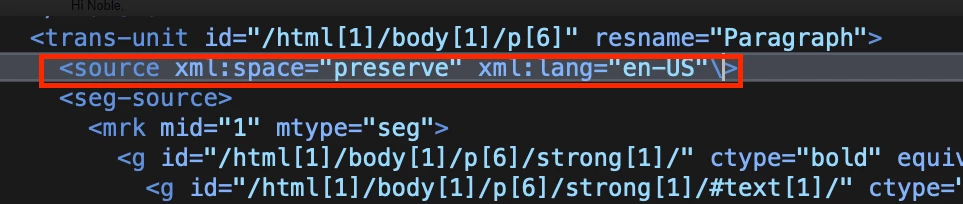
Curious if anyone else has run into this issue, and if anyone has a solution or a workaround.


One of the primary reasons we just upgraded to RH 2020 was so we could use this XLIFF export for translation, and to now discover that RH spits out malformed XLIFF is very frustrating. 


-Jason 


    This topic has been closed for replies.

    5 replies

    Vivek Kumar
    Adobe Employee
    Adobe Employee
    February 25, 2021

    We are looking into the Machine Translation API issue. There seems to be some change in the API from Google's side. 

    Peter Grainge
    Community Expert
    Community Expert
    February 24, 2021

    If you want to take up Vivek's beta offer, click his name and send him a private message with your email contact details.


    Do make sure you use the beta on a non production machine.

    ________________________________________________________
    See www.grainge.org for free Authoring and RoboHelp Information

    Use the menu (bottom right) to mark the Best Answer or Highlight particularly useful replies. Found the answer elsewhere? Share it here.
    Vivek Kumar
    Adobe Employee
    Adobe Employee
    February 24, 2021

    Hi Jason,


    We have taken it up to enhance and populate <source> tag also in update 4 itself. If you want to beta test it then we can include you in the prerelease forum if you are not there already.


    Thanks,

    Vivek

    Participating Frequently
    February 24, 2021

    Thank you for the reply. I'll definitely keep an eye out for update 4.


    In the meantime, we've had to abandon our plan to use the "Manual Translation" feature in RH because of these issues with the XLIFF files.


    Our next plan was to use the "Machine Translation" feature instead, and send the content directly to Google Translate. We can't get this feature to work either. I'm trying to create the Translation Profile in RH. I entered my Google API Key, and what I THINK is the correct endpoint: https://translation.googleapis.com/language/translate/v2


    When I click Validate, I just get an "invalid credentials" error. I know my API key is valid, because I'm able to send API calls to the above endpoint outside of RH, and it works just fine. But I can't get the Validate feature to accept my Key / Endpoint. Any thoughts or suggestions? 


    This has all been terribly frustrating. The main reason we updated to RH2020 was because of these highly-touted translation features. But now we can't seem to get any of them to actually work. 

    Community Expert
    February 24, 2021

    While this discusses Microsoft translation, perhaps something will help for your situation?

    https://community.adobe.com/t5/robohelp/configure-machine-translation/td-p/11704673

    Community Manager
    February 19, 2021

    Hi Jason,


    RoboHelp's XLIFF is completely XLIFF 1.2 compliant.


    @jasong13862791 wrote:

    (...) Specifically, he said that the strings to be translated need to be wrapped within <source> tags. (...)


    This statement is not correct and not in line with the OASIS XLIFF 1.2 Specification. In the contrary, the standard explitily allows that:

    Content for source can be "Text, Zero, one or more of the following elements: <g>, <x/>, <bx/>, <ex/>, <bpt> , <ept>, <ph>, <it> , <mrk>, in any order".

    RoboHelp puts the translatable text into the seg-source element, which is also completely compliant with the standard.


    The reason why they might have problems with the XLIFF is that their parser might not have the standard fully implemented and can only parse source, but not seg-source. That is, their level of XLIFF support would be limited and not 100% standard compliant.

    Participating Frequently
    February 19, 2021

    Thanks so much for the detailed reply! I've taken your response back to our translation vendor. Seems like maybe their XLIFF parser isn't as good as they led us to believe ....


    Jeff_Coatsworth
    Community Expert
    Community Expert
    February 19, 2021

    Are you all patched up? You don't mention what point version you're on. Check Help > Updates to check.

    Participating Frequently
    February 19, 2021

    Sorry, forgot that detail. I'm running 2020.3.32.