
Known Participant
January 6, 2015
Question

Is there a document that explains the meaning of the various icons used in RoboHelp 11 interface?

  • January 6, 2015
  • 1 reply
  • 458 views

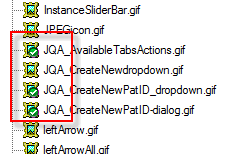
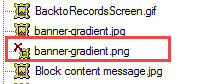
In the images folder within my project, I see these 'icons' but don't know what they mean.

What does the green check mark indicate? What does the red X mean? I've search the documentation (.html pages) and found nothing that explains the meaning
Any help is appreciated.

Thanks, Mary

    This topic has been closed for replies.

    1 reply

    Captiv8r
    Legend
    January 6, 2015

    Hi there

    Normally, the red x over an image indicates that the image has been referenced in a topic, but isn't being found on disk. Perhaps someone deleted it.

    As for the green check mark, I believe these are related to using the image in conjunction with the Resource Manager. I believe the green check mark is an indication that the image is in sync with the copy of the image in the location specified by the Resource Manager.

    Unless something exists in the help documents somewhere, I'm unaware of any table or cross reference for what the icon images mean. Sorry

    For me, the help system for Adobe products is nearly unusable. I much preferred it when they offered CHM help. But I'm a lonely voice.

    Cheers... Rick

    mkcoffeeAuthor
    Known Participant
    January 6, 2015

    Thanks for your reply. I also find the help system of almost no help. It explains topics but only from the perspective of someone very familiar with the program .

    I'm unaware of the uses of the Resource Manager--should I be using it? Seems strange that only those 3 images have the connection with Resource Manager.

    Still learning,

    Mary

    mkcoffeeAuthor
    Known Participant
    January 6, 2015

    Strange luck--I came across this table in the help system. It's a start

    Adobe RoboHelp 11 * Create and manage projects