
EmanAssem
Inspiring
April 7, 2020
Answered

Is there a way to apply tabs or collapsible sections in the topic page?

  • April 7, 2020
  • 4 replies
  • 552 views

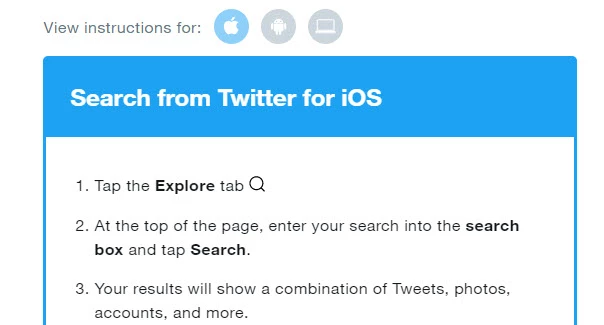
I need to use the help project for mobile and add steps for Andriod and iOS devices. Is there a way to include tabs or collapsible sections within the help page like in this screenshot from Twitter? As, we need to apply switcher based on device. I can only find expanding text.
    This topic has been closed for replies.
    Correct answer Peter Grainge

    In a responsive or frameless output your app would call the relevant page but there's no concept or context sensitive help in the mobile app. No way I know of that the help can sense the users device.


    Dropdowns can be set to have a twisty such as an arrow. I haven't tested that in an app but most other features work so no reason to doubt. They are set up in the CSS as described in RoboHelp's own help.


    I have only used twisties with dropdowns as do most others. Trial and error with expanding text.


    4 replies

    Peter Grainge
    Community Expert
    Community Expert
    April 8, 2020

    I have an email notification of a post that's not appearing in this thread. The dropdown can include images so I'm not sure why you are having a problem. Check the code.


    Use the menu (bottom right) to mark the Best Answer or Highlight particularly useful replies. Found the answer elsewhere? Share it here.
    Peter Grainge
    Community Expert
    Community Expert
    April 8, 2020

    I would recommend the built in twisties done via the CSS rather than the twisty scripts. These were created for older versions when there was no built in option. I believe they will still work but the CSS method is easier.


    Use the menu (bottom right) to mark the Best Answer or Highlight particularly useful replies. Found the answer elsewhere? Share it here.
    Peter Grainge
    Community Expert
    Peter GraingeCommunity ExpertCorrect answer
    Community Expert
    April 8, 2020

    In a responsive or frameless output your app would call the relevant page but there's no concept or context sensitive help in the mobile app. No way I know of that the help can sense the users device.


    Dropdowns can be set to have a twisty such as an arrow. I haven't tested that in an app but most other features work so no reason to doubt. They are set up in the CSS as described in RoboHelp's own help.


    I have only used twisties with dropdowns as do most others. Trial and error with expanding text.


    Use the menu (bottom right) to mark the Best Answer or Highlight particularly useful replies. Found the answer elsewhere? Share it here.
    EmanAssem
    EmanAssemAuthor
    Inspiring
    April 8, 2020

    @Peter Thank you for your reply. I've checked the Twisty part in your Help site. Thanks

    Peter Grainge
    Community Expert
    Community Expert
    April 7, 2020

    I don't know what you mean by "switcher".


    Tabs are not an option. Dropdowns are an alternative to expanding text.


    Use the menu (bottom right) to mark the Best Answer or Highlight particularly useful replies. Found the answer elsewhere? Share it here.
    EmanAssem
    EmanAssemAuthor
    Inspiring
    April 8, 2020

    @Peter I mean having tabs or expanding sections to apply a plug-in, so when users on mobile device search for something, the page opens on the section related to their device.

    For example, If a user needs to know how to submit a request and has an Andriod device, the help topic page for submitting requests will have sections called  "Web", Andriod", "iOS". But when they search, it shall open directly on the section for "Andriod".


    As for expanding dropdown, is there a way to add a clickable icon beside the title like an arrow icon?