


Known Participant
February 12, 2013
Question

Issue displaying frames in Chrome

  • February 12, 2013
  • 2 replies
  • 17630 views

Hi all -

We are currently using RoboHelp HTML 7.0

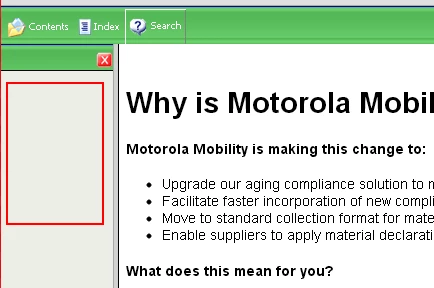
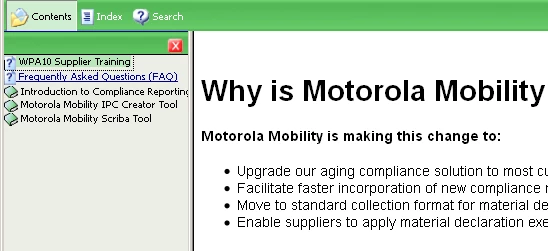
When I publish, frames cannot be viewed when using Chrome, although they are just fine when using IE or Firefox. This is the publically shared URL for accessing this file - http://responsibility.motorola.com/web_help/index.htm

I've been told by co-workers this is not a version issue, it does not work for higher versions of RoboHelp either. Does anyone know the accuracy of this statement? As Motorola is now owned by Google, it's obviously of concern.

Note that I have installed IE extensions for Chrome, it did not make a difference

Chrome:
Firefox:
Thank you,

Anahid

This topic has been closed for replies.

2 replies

AnahidMAAuthor
Known Participant
February 20, 2013

Issue resolved!

Simply click on your Google Chrome controls (the three bars in upper right corner), and choose "New Incognito Window". Voila! All your frames are properly displayed and links work properly

Anahid

Participating Frequently
June 29, 2022

Hi,


Can you tell me how did you resolve the issue:

In chrome,


In IE,


Please could you tell what changes to be done to make it compatible.


Peter Grainge
Community Expert
Community Expert
June 29, 2022

This thread is nine years old. The OS and browser versions will be different. Which version of RoboHelp are you using and is the browser up to date?

________________________________________________________

My site www.grainge.org includes many free Authoring and RoboHelp resources that may be of help.


Use the menu (bottom right) to mark the Best Answer or Highlight particularly useful replies. Found the answer elsewhere? Share it here.
Inspiring
February 12, 2013

I know that my answer will not be satisfactory to you, but frames are old fashioned and designs should be move towards multi column CSS (divs). I myself have an intranet application based on frames and since it is owned by me and only used in the company I can afford to stay with frames and prescribe certain broswers, but I even think of modernizing it to a non-frame based design.

But to give you at least a straw: I looked at the page with HTML Validator. It has no doctype and there are about 14 errors, some related to dangling frame endtag elements. Maybe you clean that up first and look again if Chrom then likes your page.

--

Christoph

Peter Grainge
Community Expert
Community Expert
February 12, 2013

Christoph is correct that CSS is preferred but frames are so much easier and as far as OLH is concerned, unless you have Rh10 you have no option but to output your help in the classic tripane layout that uses frames. Rh10 has Multiscreen HTML5 that does not use frames.

The issue with Chrome is when the frames are viewed locally rather than when they are on a server. Later versions of Rh do not have the problem you are seeing once the help is on a server and authors can view in Chrome locally in Rh10.

Your problem is the version of Rh you are using was affected by a change Google made that no other browser saw as necessary. I think you will find the solution to your problem in Item 2 at http://www.grainge.org/pages/snippets/snippets.htm#browsers


See www.grainge.org for RoboHelp and Authoring tips

@petergrainge

Use the menu (bottom right) to mark the Best Answer or Highlight particularly useful replies. Found the answer elsewhere? Share it here.
AnahidMAAuthor
Known Participant
February 12, 2013

Hi Peter,

You continue to amaze me. A little insomnia at 2:30 AM, and come back a few hours later to find a solution!

I think I will be migrating to RoboHelp 10, I'm waiting for a quote to come back. But in the meantime I will try your solution. That would be great as we obviously want people to use Chrome ;-)

Cheers,

Anahid