Participant
March 19, 2020
Question

Issue with Robohelp 8

  • March 19, 2020
  • 3 replies
  • 263 views

I am encountering Appcrash everytime I try to open a project. The project was working fine but now is giving the following warning and then closing.
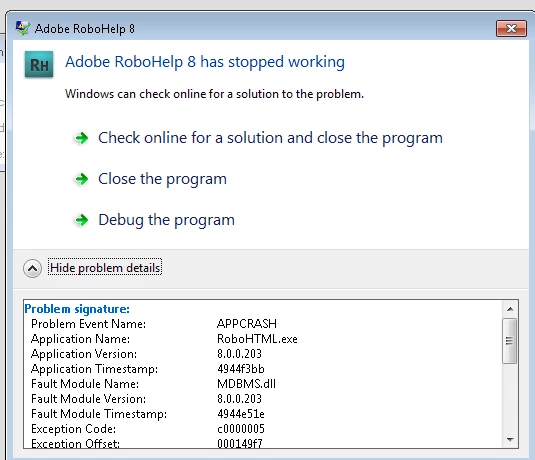


Any help to resolve the issue will be appreciated.

    This topic has been closed for replies.

    3 replies

    Jeff_Coatsworth
    Community Expert
    Community Expert
    April 22, 2020

    Not a chance - if RH8 needs XP to run, your only option is to try running in compatibility-mode or inside a VM that's running XP.

    Peter Grainge
    Community Expert
    Community Expert
    April 22, 2020

    According to the link I posted, RoboHelp 8 was not compatible with Windows 7. Sometimes apps will work on an incompatible version but a change to that can change that. There have been some security changes to Windows 7 so maybe that's the reason. Just a guess.


    When a program that is long out of support is used on an incompatible platform, there's not much that can be done.


    I'm sorry but I can't help you on this one.


    Use the menu (bottom right) to mark the Best Answer or Highlight particularly useful replies. Found the answer elsewhere? Share it here.
    Participant
    April 22, 2020

    Yes, Peter. I looked at the knowledge base article that you shared earlier and was wondering whether the incompatibility is the reason for appcrash.

    Will check if I can install it on Windows 8 and see if that works. 

    Thanks again.


    Regards,

    Abhishek Sinha

    Peter Grainge
    Community Expert
    Community Expert
    March 19, 2020
    1. Check whether another project will open. Try one of the sample projects.
    2. What operating system are you on. See https://helpx.adobe.com/robohelp/kb/robohelp-operating-system-microsoft-word.html for compatibility.
    3. What output are you creating? Anything other than CHMs will almost certainly have issues with modern browsers.


    Use the menu (bottom right) to mark the Best Answer or Highlight particularly useful replies. Found the answer elsewhere? Share it here.
    Participant
    April 22, 2020

    Thanks Peter for your response. It worked for sometime after I restarted my system but the issue seems to be back. I am using Windows 7 OS and the Robohelp version is 8. The output that I generate using my project is a .CHM file.


    Not sure how to handle this error.