

Issue with the alignment of notes
Dear All,
We tried upgrading files from RoboHelp 2017 to 2022.
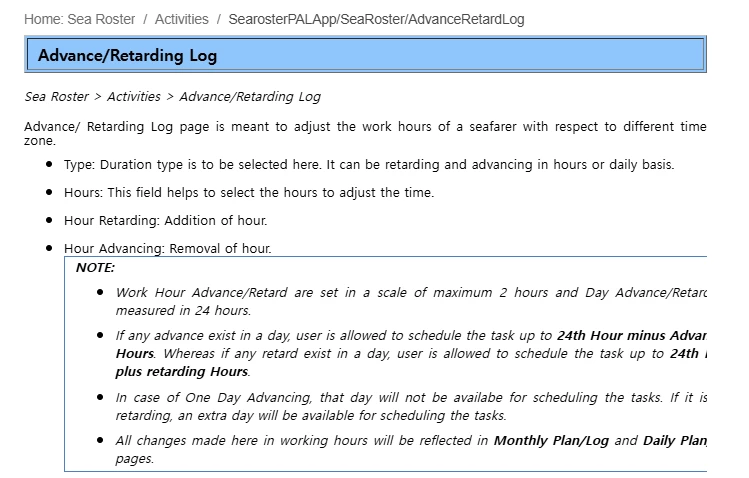
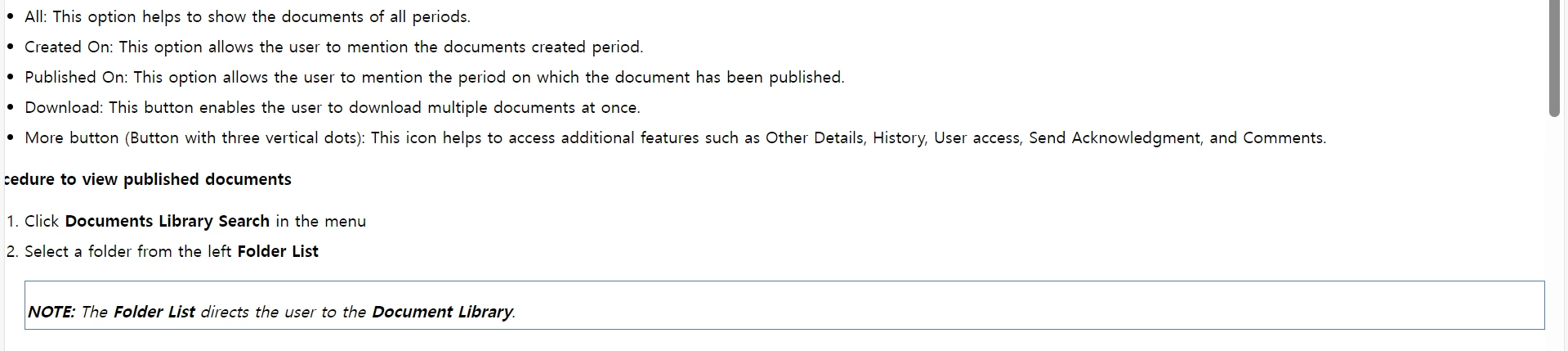
But some of the notes are unaligned (border is not complete) as given below.
Robo Help 2022
RoboHelp 2017
Can anyone suggest a solution?

Dear All,
We tried upgrading files from RoboHelp 2017 to 2022.
But some of the notes are unaligned (border is not complete) as given below.
Robo Help 2022

RoboHelp 2017

Can anyone suggest a solution?
Ideally, you'd have a div/table with a 'note' class. In that case, it' be easy to just assign them a CSS 'width: 95%'.
Inline styles make it very hard to accurrately and robustly grasp them with CSS. Using a CSS selector on inline styling only works if all your inline styles are exactly the same.
If we naïvely assume that all your 'notes' are actually table tags with the following exact inline styling:
<table style="border: 1px solid #6792C6;">...</table>
Then you ''could'' add the following CSS:
table[style="border: 1px solid #6792C6;"] {
width: 95%;
}
If the inline styling tends to differ from note to note, then consider yourself unlucky.
Already have an account? Login
Enter your E-mail address. We'll send you an e-mail with instructions to reset your password.