Known Participant
June 18, 2013
Answered

Issue with URL on new webhelp

  • June 18, 2013
  • 1 reply
  • 762 views

Hi all -

Back again with an odd problem. I have created several new robohelp KB's this year, but this one is behaving oddly.

I'm still using good old Robohelp HTML v7. When I view my webpage, I have to add the project_name.htm# to see the home page. Never seen this one before! But I'm sure I've done something silly.

Project name is Flex Citrix Access:

My home page is saved as index.htm, as all are:
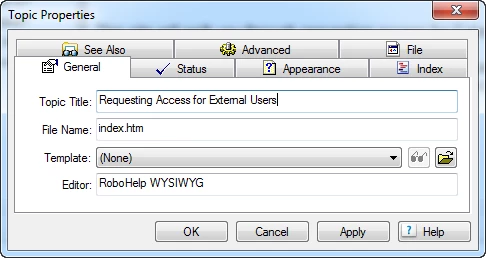
When I publish it's properly selected:
if I enter the URL citrix-access-account.mot-mobility.com, it comes up but is not showing the full frame:
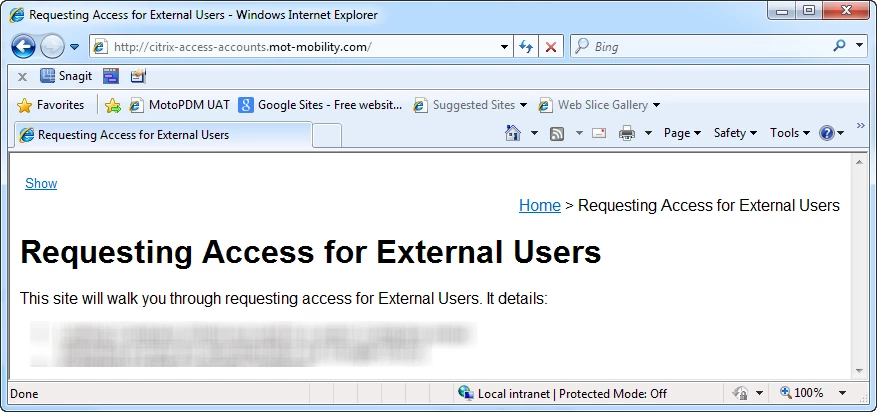
If I click on Show - I see what I expect, and what I see for every other web help I have...

However, the URL I would have to enter to get this is -

http://citrix-access-accounts.mot-mobility.com/Flex-Citrix-Access.htm#

This topic has been closed for replies.
Correct answer Captiv8r

Hi there

You have unfortunately fallen into a bit of a trap and you are confusing the WebHelp start page with the Default Topic.

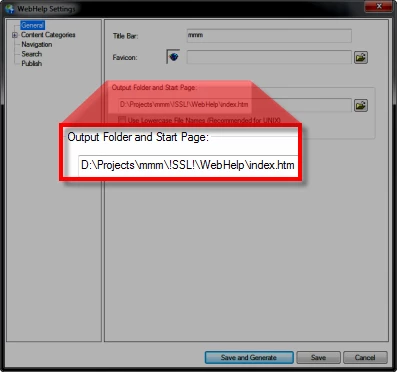
When you want to open WebHelp, you point at the WebHelp Start page. THAT is the page that is typically named Index.htm and it's listed in the General section of your Single Source Layout properties as shown below:

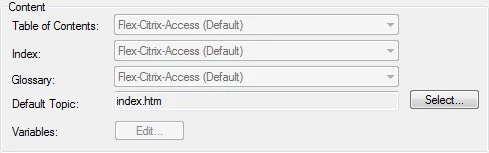
When that page loads it triggers a cascade of events. The last event that happens is that the Default Topic is loaded into the Topic pane and presented to the user. The Default Topic is configured in a different area of this same dialog. I think. I no longer have RoboHelp 7 to look at. My screens are from RoboHelp 10. So you may see this on the first of several screens of the same dialog. Normally you have to click a button and browse to the file you wish to nominate as the Default Topic.

Essentially, you have named your default topic to what you really intended for the WebHelp Start Page to be named.

Cheers... Rick

1 reply

Captiv8r
Captiv8rCorrect answer
Legend
June 18, 2013

Hi there

You have unfortunately fallen into a bit of a trap and you are confusing the WebHelp start page with the Default Topic.

When you want to open WebHelp, you point at the WebHelp Start page. THAT is the page that is typically named Index.htm and it's listed in the General section of your Single Source Layout properties as shown below:

When that page loads it triggers a cascade of events. The last event that happens is that the Default Topic is loaded into the Topic pane and presented to the user. The Default Topic is configured in a different area of this same dialog. I think. I no longer have RoboHelp 7 to look at. My screens are from RoboHelp 10. So you may see this on the first of several screens of the same dialog. Normally you have to click a button and browse to the file you wish to nominate as the Default Topic.

Essentially, you have named your default topic to what you really intended for the WebHelp Start Page to be named.

Cheers... Rick

AnahidMAAuthor
Known Participant
June 18, 2013

Sigh - you are 100% correct. I think you resolved two problems in one for me...

You rock, Rick!!!

Captiv8r
Legend
June 18, 2013

LOL, well I used to. I also roll!

Happy it helped... Rick