markn999
Participant
October 15, 2015
Answered

Issues after upgrading from Robohelp 8 to 11

  • October 15, 2015
  • 1 reply
  • 377 views

I am no expert in Robohelp having picked up support for our product's help fairly recently so I might be missing something obvious to experts here.  However, I had a project in Robohelp 8 and upgraded to version 11.  The upgrade seemed to run fine and I could generate my HTML help file.  But when I open the file, while I do get the correct default topic the window caption is incorrect.  It actually uses the same caption for all help topics.  I am also missing the Contents, Index and Search pane.  I compared my generate options to those in version 8 and everything looks exactly the same.  Help!
This topic has been closed for replies.
Correct answer Captiv8r

One thing I just noticed that's different: the eHlpDhtm.js file that is generated by Robohelp has this variable defined on version 11:

var HH_WindowName = "select||bogus||tshoot||softcopy||(w95sec)||options||main||task||main ruleWorkshop-supplied Window||uxt";

On version 8 it's:

var HH_WindowName = "main||select||task||uxt||options||tshoot||(w95sec)||bogus||softcopy||main_ruleWorkshop-supplied Window";

When I look in Windows under Project Set-up "select" has TOC & Index unchecked (while "main" has it checked) and "select" also has a Window Caption of the bad caption I'm seeing on all my windows.  So it's looking like it's using the wrong one of these but I see nowhere I can change which one is used.


Hello again

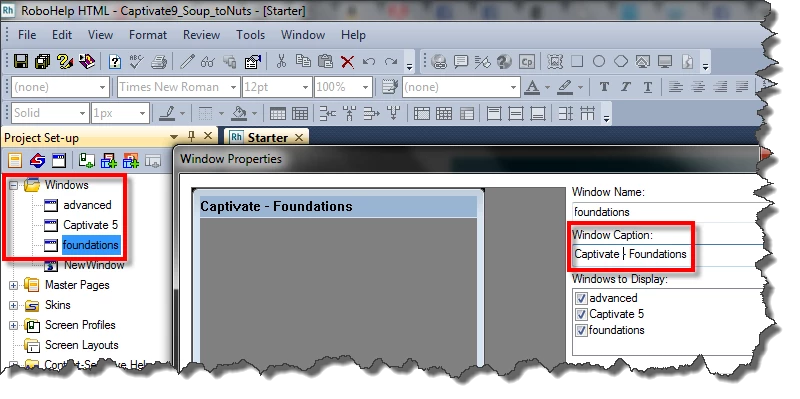
For CHM files, the Window title is typically defined in the Window Properties found in the Project Set-up pod.

So open that pod, then double-click the window you want. Change what appears in the Window Caption field.

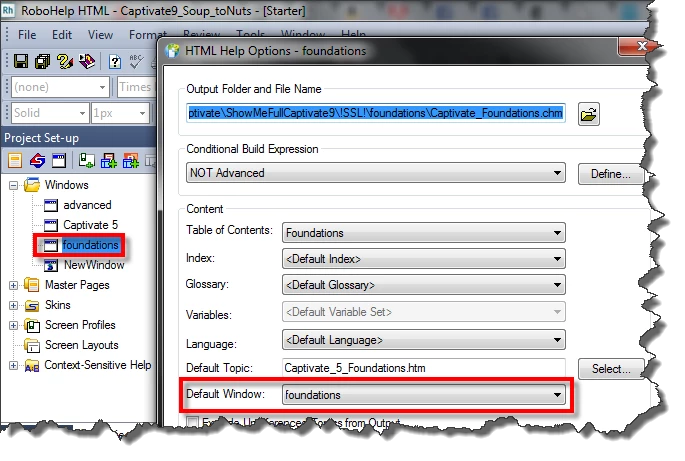
When you generate the output, be sure you are pointing to the desired window:

Cheers... Rick

1 reply

Captiv8r
Legend
October 15, 2015

What is the output?

Microsoft HTML Help (CHM format), or WebHelp or something else?

Cheers... Rick

markn999
markn999Author
Participant
October 15, 2015

It's a CHM file.  I also need Webhelp output but haven't gotten to trying that out yet.

markn999
markn999Author
Participant
October 15, 2015

One thing I just noticed that's different: the eHlpDhtm.js file that is generated by Robohelp has this variable defined on version 11:

var HH_WindowName = "select||bogus||tshoot||softcopy||(w95sec)||options||main||task||main ruleWorkshop-supplied Window||uxt";

On version 8 it's:

var HH_WindowName = "main||select||task||uxt||options||tshoot||(w95sec)||bogus||softcopy||main_ruleWorkshop-supplied Window";

When I look in Windows under Project Set-up "select" has TOC & Index unchecked (while "main" has it checked) and "select" also has a Window Caption of the bad caption I'm seeing on all my windows.  So it's looking like it's using the wrong one of these but I see nowhere I can change which one is used.