Legend
February 14, 2013
Question

Issues with hanging indentation in RH10

  • February 14, 2013
  • 3 replies
  • 3673 views

Hi

I am facing somewhat strange issue (not sure if this is a known bug) with indentation.

I imported FrameMaker 11 document into RoboHelp using the settings ISF file. In RoboHelp, I want 2nd line of a list item (say bulleted list) to start from the point where the first letter of the first line starts. Normally, I do it using hanging indents. However, I am not able to get this here. I am generating WebHelp output.

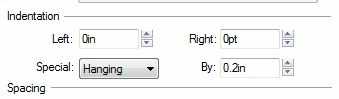
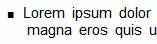
Here are screenshots of different paragraph settings and their WebHelp output as viewed in FireFox:

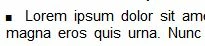
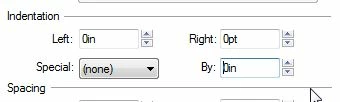
1.  The output of zero indentation is correct.
 

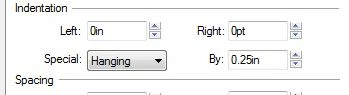
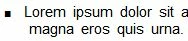
2. Then, I changed the hanging identation to 0.25 in to check the output. I noticed that the 2nd line is starting slightly after the 1st word of 1st line. So, I reduced the hanging indentation in my next attempt.
3.  Here, I reduced the indentation to 0.2in. Now, instead of reducing the space before 2nd line, I noticed that the space between the bullet and 1st letter of 1st line has changed.
Where am I going wrong? Please guide. The outcome of zero indentation is looking very unprofessional and I need to get this right in the settings file.

This topic has been closed for replies.

3 replies

Matt-Tech Comm Tools
Community Expert
Community Expert
February 14, 2013

Can you also supply the HTML code for your list? It looks like you haven't mapped your bulleted list para to BodyLevel1, and converted the autonumber to an HTML list.

-Matt Sullivan, FrameMaker Course Creator, Author, Trainer, Consultant
Jeff_Coatsworth
Community Expert
Community Expert
February 14, 2013

another suggestion - it may be an artifact of the font - try using a fixed-width font like Courier to see if that has any effect

Jeff_Coatsworth
Community Expert
Community Expert
February 14, 2013

you may have to play around with the CSS to get your desired result; then you can apply that CSS to all topics when you generate the help

Matt-Tech Comm Tools
Community Expert
Community Expert
February 14, 2013

Yes, you may need to fiddle with the CSS, but once you figure out the settings, modify the mapping CSS (RHStyleMapping.css by default) so that you don't need to manually apply CSS or apply via the SSL in RH.

-Matt Sullivan, FrameMaker Course Creator, Author, Trainer, Consultant
Legend
February 14, 2013

Hi


I tried with the Courier font, but it didn't help. Here are all the info you asked for:


HTML code:

<?rh-list_start class="MLB1" level="1" style="list-style: rh-list; list-style: rh-list;" ?><p class="BodyLevel1">Lorem ipsum dolor sit amet, consectetuer adipiscing

elit. Maecenas porttitor congue massa. Fusce posuere, magna sed pulvinar  ultricies, purus lectus malesuada libero, sit amet commodo magna eros quis urna. Nunc viverra imperdiet enim. Fusce est. Vivamus a tellus.</p><?rh-list_end ?>

CSS of BodyLevel1 (the "padding-left" data was not available in the default CSS. I have added it manually after Jeff's suggestion.)

p.BodyLevel1 {

          margin-right: 0.000pt;

          text-align: left;

          word-spacing: 0.250em;

          font-style: normal;

          font-weight: normal;

          color: #000000;

          letter-spacing: 0.00em;

          font-size: 11pt;

          margin-top: 0pt;

          list-style: rh-list;

          x-list-class: MLB1;

          x-list-level: 1;

          margin-bottom: 4.5pt;

          font-family: Arial;

          text-indent: 0in;

          padding-left: 0.2in;

          margin-left: 0in;text-decoration: none;

}

Here, MLB1 is the Multi-level List where I have defined the bullet style and size. I have tagged this style to BodyLevel1.

CSS of MLB1 (if that helps)

}

rh-list.MLB1 {

          x-lvl-2-type: lower-alpha;

          x-lvl-2-format: "<x>&c";

          x-lvl-2-margin: 20px;

          x-lvl-3-type: lower-roman;

          x-lvl-3-format: "<x>&c";

          x-lvl-3-margin: 40px;

          x-lvl-4-type: decimal;

          x-lvl-4-format: "&o<x>&c";

          x-lvl-4-margin: 60px;

          x-lvl-5-format: "&o<x>&c";

          x-lvl-5-margin: 80px;

          x-lvl-6-type: lower-roman;

          x-lvl-6-format: "&o<x>&c";

          x-lvl-6-margin: 100px;

          x-lvl-8-type: lower-alpha;

          x-lvl-8-margin: 140px;

          x-lvl-7-format: "<x>.";

          x-lvl-7-margin: 120px;

          x-lvl-9-type: lower-roman;

          x-lvl-9-margin: 160px;

          x-lvl-1-format: "<x>";

          x-level-count: 9;

          x-lvl-1-type: filled-square;

          x-lvl-1-p-class: BodyLevel1;

          x-lvl-1-p-tag: p;

          x-lvl-1-pfx-class: rls-1-MLBO;

}