
Known Participant
June 18, 2020
Answered

Issues with strange letters in Microsoft HTML output

  • June 18, 2020
  • 9 replies
  • 363 views

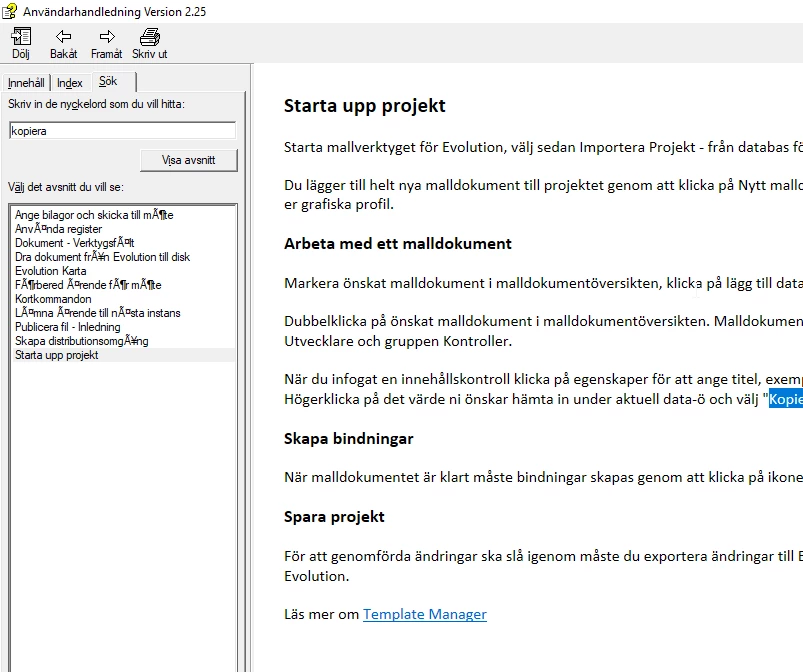
I bought 2019 but now I've got some issues with strange letters in the HTML output. I've got the swedish version and we have the letters åäö but its never been an issue with the older version we had. And its just under the search-tab. Do you know how I'll fix it?
    This topic has been closed for replies.
    Correct answer Peter Grainge

    OK but just don't apply Update 13.


    9 replies

    Peter Grainge
    Community Expert
    Community Expert
    June 22, 2020

    Update 14 is now available and addresses the Classic upgrade issues that were in Update 13.


    Use the menu (bottom right) to mark the Best Answer or Highlight particularly useful replies. Found the answer elsewhere? Share it here.
    Known Participant
    June 22, 2020

    Thank you Peter, update 12 solved the problem 🙂

    Have a nice day.

    /Anna

    Peter Grainge
    Community Expert
    Peter GraingeCommunity ExpertCorrect answer
    Community Expert
    June 18, 2020

    OK but just don't apply Update 13.


    Use the menu (bottom right) to mark the Best Answer or Highlight particularly useful replies. Found the answer elsewhere? Share it here.
    Known Participant
    June 18, 2020

    Thanks Peter, I will try this after the weekend. I will let you know how it works. 🙂

    Peter Grainge
    Community Expert
    Community Expert
    June 18, 2020

    First of all, you cannot export back to Classic from New UI. When you upgraded to New UI, your old Classic project was left untouched so you will be able to revert to that if necessary but let's see if we can fix things or, at least, establish there is a bug.


    I think you are saying that any one of the åäö characters gets replaced with this, correct?


    I think Update 12 might have fixed some CHM issues so let's try that first. Do not apply that from Help > Updates. Instead follow these steps.


    1. Go to https://www.adobe.com/support/robohelp/downloads.html and download Update 12.
    2. Install that.
    3. Create a copy of your old Classic project as a backup.
    4. Open that in 2019 New UI and generate the CHM.


    Let me know how that goes even if it doesn't work. I assume you have set the project language to Swedish.


    Use the menu (bottom right) to mark the Best Answer or Highlight particularly useful replies. Found the answer elsewhere? Share it here.
    Known Participant
    June 18, 2020

    So far we only use Microsoft HTML Help and printed documentation, do you still recomend that I use the classic version? Do I have to export it back to classic then in some way or should I rather try the update? I have 2019.0.11 so I havent updated it yet.

    Peter Grainge
    Community Expert
    Community Expert
    June 18, 2020

    Have you applied Update 13?


    That may be what is needed but it's important you do not apply that update if you will also be using 2019 Classic.


    There is an issue with Update 13 that only affects Classic so you could apply it to 2019 New UI if that is all you will be using. However, there is then a further complication. If you are only creating CHMs, then for now Classic might be a better option anyway, just not with Update 13.


    Let me know whether you are using both versions or just the new UI and I will be better able to guide you.


    Use the menu (bottom right) to mark the Best Answer or Highlight particularly useful replies. Found the answer elsewhere? Share it here.
    Known Participant
    June 18, 2020

    I exported it from classic to 2019 so its the new version.

    Peter Grainge
    Community Expert
    Community Expert
    June 18, 2020

    Which version of 2019 are you using, Classic or New UI?


    Use the menu (bottom right) to mark the Best Answer or Highlight particularly useful replies. Found the answer elsewhere? Share it here.