
Inspiring
December 8, 2023
Question

Java Requirement for PDF generation

  • December 8, 2023
  • 2 replies
  • 547 views

Hi All,

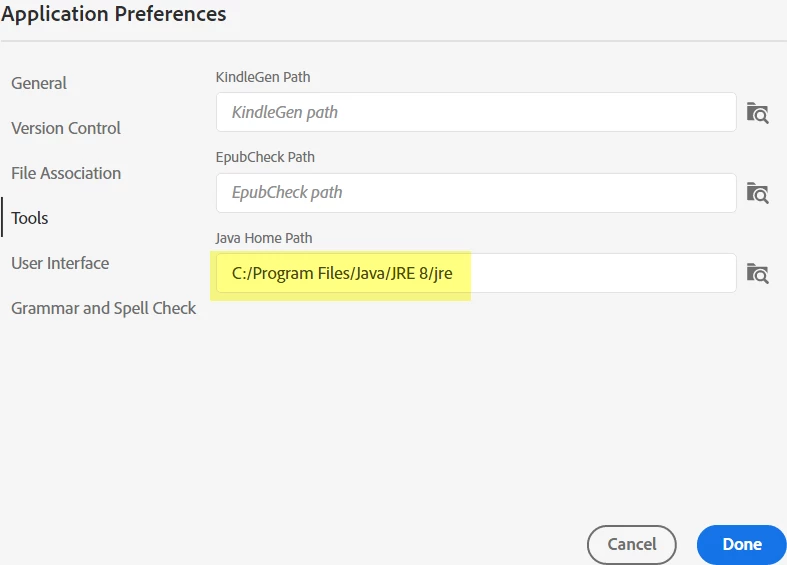
PDF generation requires JAVA 8 to be installed on the PC.  Now, that JAVA 8 is licensed, is there any alternative for this? In the Application preference, I can see that we can browse for the Java installation path.  


    This topic has been closed for replies.

    2 replies

    Peter Grainge
    Community Expert
    Community Expert
    December 8, 2023

    The field you have shown is only required if RoboHelp cannot find the path to the required version, typically if it has been installed to other than the default.

    ________________________________________________________

    My site www.grainge.org includes many free Authoring and RoboHelp resources that may be of help.


    Use menu (bottom right) to mark as Best Answer or to Highlight particularly useful replies. Found the answer elsewhere? Share it here.
    Peter Grainge
    Community Expert
    Community Expert
    December 8, 2023

    You don't need any paid for version of Java. See https://www.grainge.org/pages/authoring/rh_tour/rh2022/outputs/outputs_pdf.htm


    I have the correct version installed and can generate PDFs. The Home Path you show is not required for PDF generation.

    ________________________________________________________

    My site www.grainge.org includes many free Authoring and RoboHelp resources that may be of help.


    Use menu (bottom right) to mark as Best Answer or to Highlight particularly useful replies. Found the answer elsewhere? Share it here.
    Peter Grainge
    Community Expert
    Community Expert
    December 8, 2023

    In another thread your post shows you must have the correct version of Java installed so I'm not clear why you are asking this question.

    ________________________________________________________

    My site www.grainge.org includes many free Authoring and RoboHelp resources that may be of help.


    Use menu (bottom right) to mark as Best Answer or to Highlight particularly useful replies. Found the answer elsewhere? Share it here.