


Known Participant
November 8, 2023
Answered

Latest RoboHelp 2022.3.93 cannot publish Microsoft HTML Help (.CHM) using Japanese characters

  • November 8, 2023
  • 3 replies
  • 595 views

We recently upgraded from old RoboHelp 2017 to RoboHelp 2022 and are now publishing in frameless HTML.
All is otherwise ok except for the fact that we used to output Microsoft HTML Help (.CHM) and in RoboHelp 2017 this worked fine.

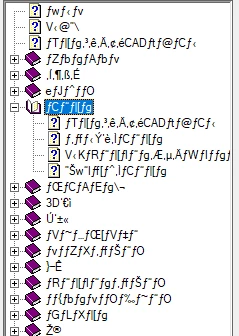
Some customers would still like to have the latest content in CHM, and our latest content is now being authored in RoboHelp 2022 and when we try to publish a .CHM file using RoboHelp 2022 the Japanese characters in the table of contents are all garbage. I have been assuming that this is a bug or something?
    Correct answer Michael33808148ov2u

    Did you ever get a solution to this problem?  I have a similar issue, my topics Japanese displays perfectly well, but cannot get the TOC for the CHM file to display correctly.   


    Solved by changing Win11 region 

    3 replies

    Community Expert
    November 8, 2023

    You need to change the Windows language and locale before generating. Here's a link to the relevant page on Peter's site:

    https://www.grainge.org/pages/snippets/snippets.htm#chms

    RH22_userAuthor
    Known Participant
    November 9, 2023

    I submitted a support request via email. As someone suggests above it seems to be related to fonts on the system. I take the point that the system should be set to Japanase however when outputting CHM files using an English copy of Windowsa the Table of Contents for a Korean, Traditional or Simplified Chinese lanuage CHM file, just as examples, appears to be okay. 

    Participant
    September 18, 2025

    Did you ever get a solution to this problem?  I have a similar issue, my topics Japanese displays perfectly well, but cannot get the TOC for the CHM file to display correctly.   

    Jeff_Coatsworth
    Community Expert
    Community Expert
    November 8, 2023

    Huh, I always thought you needed to have the Windows o/s match the language you were creating in for CHMs. Did the font being used change (or get changed in the upgrade from Classic to New UI?) - you can always go back and check the RH2017 project, it was left intact upon upgrading.

    RH22_userAuthor
    Known Participant
    November 8, 2023

    Hi Jeff,

    The font is a good point. Do you happen to recall where I can check which font a Microsoft HTML Ouput is using to create a .CHM?

    Peter Grainge
    Community Expert
    Community Expert
    November 8, 2023

    Is this on the same machine where it was working in 2017? Assuming it is, then you obviously know the setup and are testing on a machine that has the Japanese version of Windows.


    I haven't seen other posts about this problem in the new UI versions and there aren't too many CHM users supporting this forum these days.


    I suggest for this one you need to go to Adobe Support. See https://helpx.adobe.com/contact/enterprise-support.other.html#robohelp for your Adobe Support options. The email link tcssup@adobe.com is recommended as it reaches a team dedicated to Technical Communication Suite products including RoboHelp.

    ________________________________________________________

    My site www.grainge.org includes many free Authoring and RoboHelp resources that may be of help.


    Use menu (bottom right) to mark as Best Answer or to Highlight particularly useful replies. Found the answer elsewhere? Share it here.
    RH22_userAuthor
    Known Participant
    November 8, 2023

    Thanks Peter. Yes on the same machine and no is not running Windows in Japanese and with RH2017 the CHM output was fine. 

    And yes I will try that email address, I tried regular support that was AI/bot supported and ended up in endless loop of no help at all 😉