

Layout Issues when Publishing. Icons are missing, search input field is missing, etc (Version is RH10)
I have almost given up trying to solve this on my own and cant seem to find any existing documentation to help me address this. (There probably is something, somewhere, but I cant find it. And searching these forums wasnt working well either.) We are using RoboHelp 10.
In summary, here is the issue: When I publish to the WebHelp format, there are elements of the skin that are not showing up. I have fiddled with the WebHelp Settings quite a bit, but nothing seems to fix the problem I am seeing. There are multiple problems here, and I am torn over whether I should post these individually, or in one post. Im going to go with one post, so that if someone is searching later, they can see everything in one place as we (hopefully) get this resolved. (We are using a skin called "BlueGrey", but I have these same problems if we use the default layout too, so it's not a skin issue. I think its an output settings issue, but I will be danged if I can figure out what I am doing wrong.
Thanks in advance to anyone with input!
~~~~~~~~~~~~~~~~~~~~~~~~~~~~~~~~~~~~~~~~~~~~~~~~~~~~~~~~~~~~~~~~~~~~~~~~~~~~~~~~~~~~~~~~~~~~~~~~~~~~~~~~~~~~~~~~~~~~~
OutPut Settings
Before we deep dive into the layout screencaps below, here are the settings we currently have.
- So far, I have determined that I cannot select "DHTML" format because if I do, the ToC wont show up.
- However, when I select "DHTML", the problems noted below will go away.
- But... then I have no Table of Contents, which is a problem.
- If I can get the ToC to display, with a DHTML Format, then my problems go away.
- I have also discovered that the web help cant be viewed locally in Chrome, due to an issue with Chrome itself. (That was awesome. Lost 2 hours trying to resolve a phantom output issue, thinking I had done something wrong in the HTML or settings.)
- I have tried multiple permutations of these settings, but nothing seems to get the ToC to display with DHTML selected
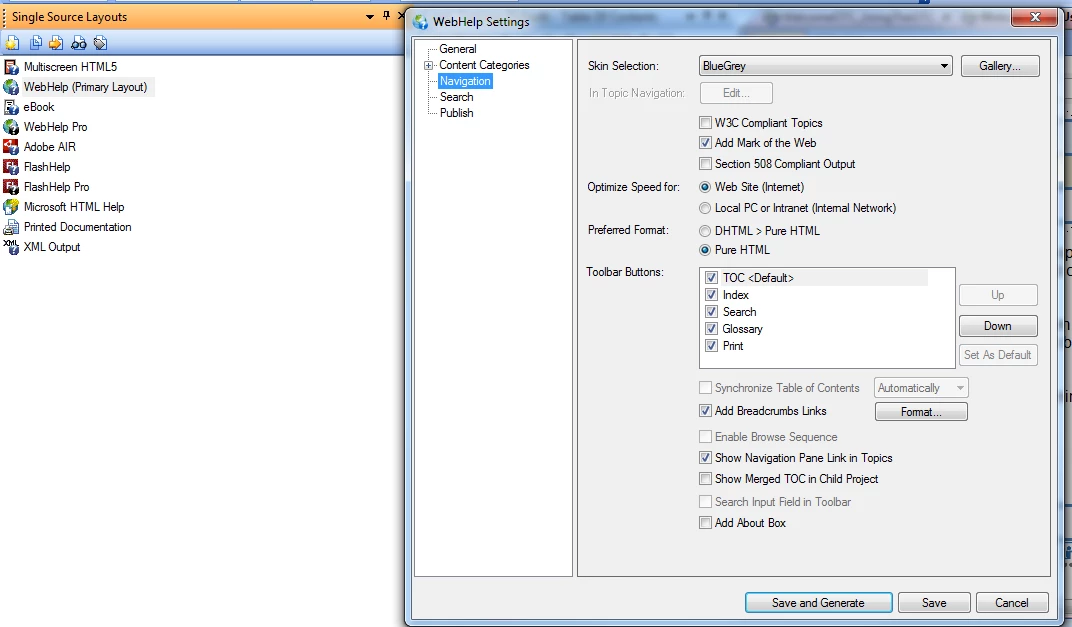
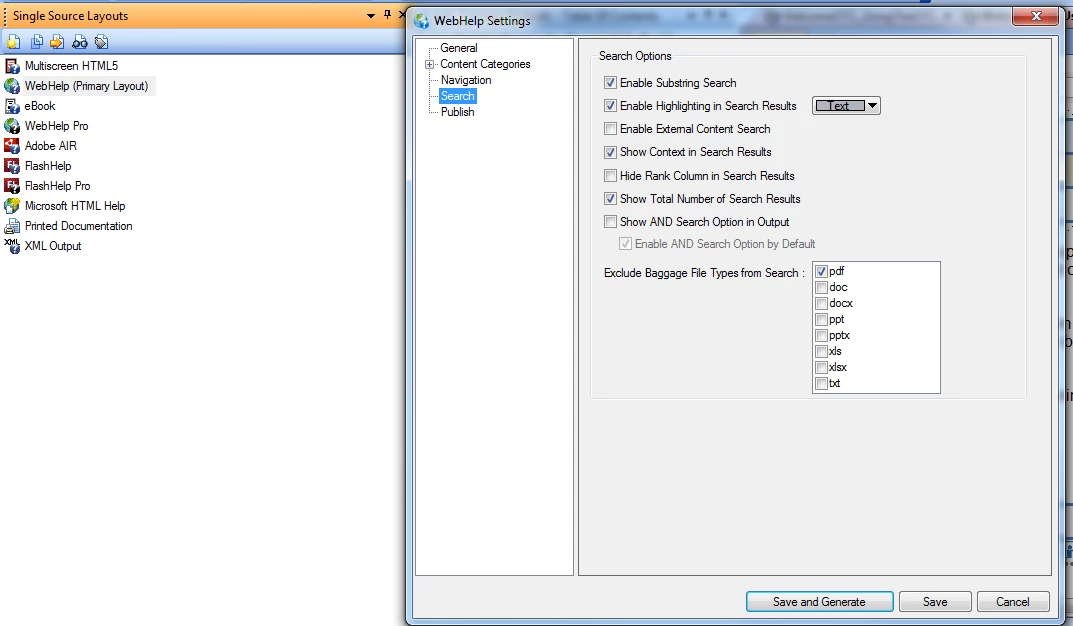
And here are the Search settings.
~~~~~~~~~~~~~~~~~~~~~~~~~~~~~~~~~~~~~~~~~~~~~~~~~~~~~~~~~~~~~~~~~~~~~~~~~~~~~~~~~~~~~~~~~~~~~~~~~~~~~~~~~~~~~~~~~~~~~
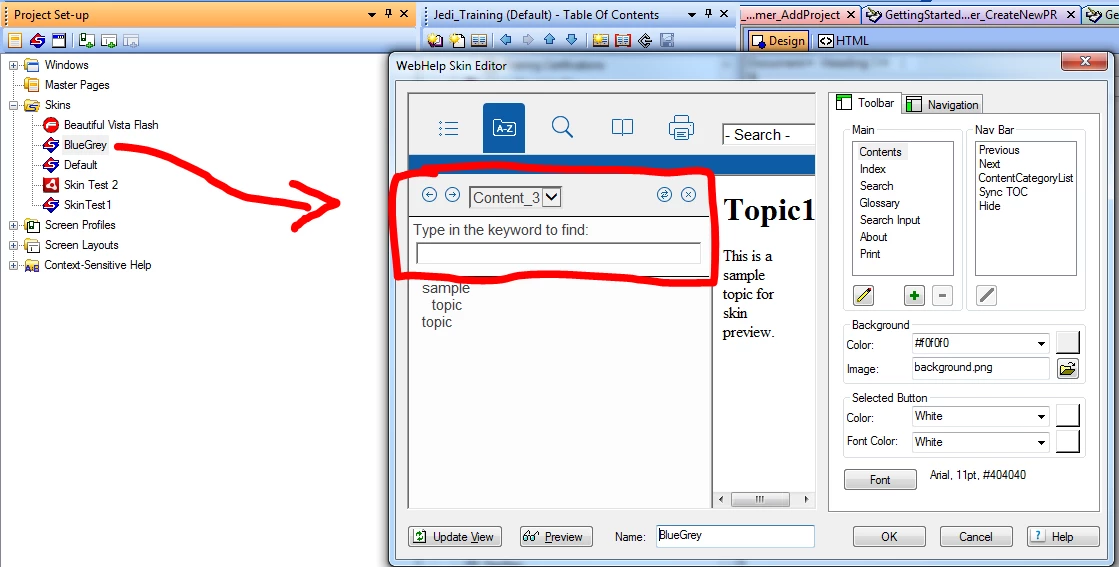
Problem #1. Images for Contents are missing
Under Contents, what I should be seeing, is this area in red.
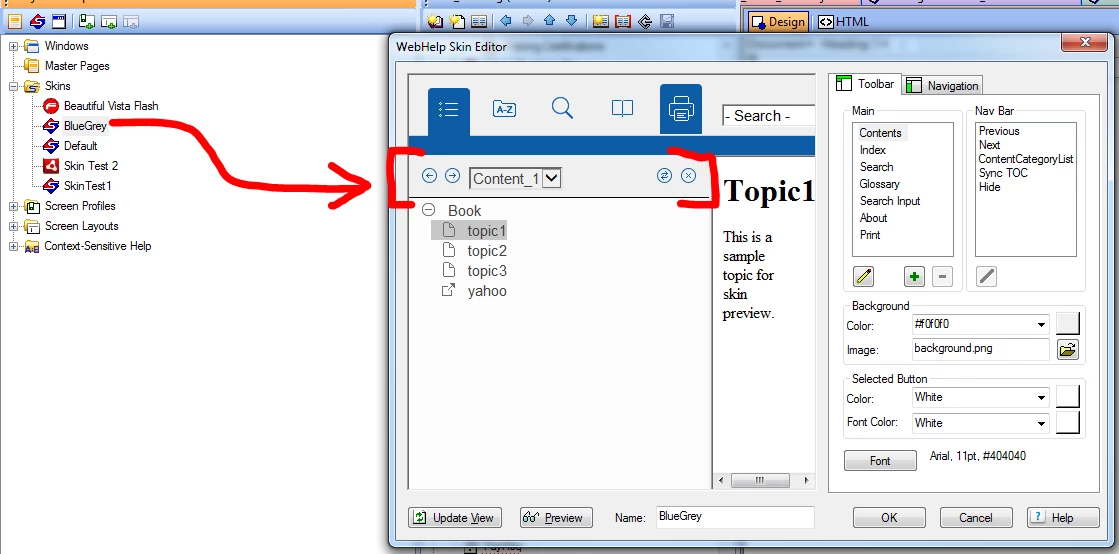
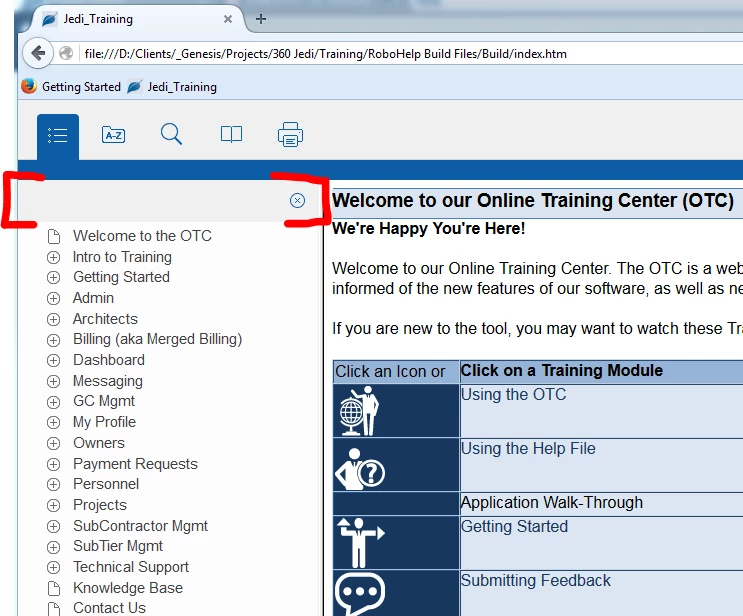
However, when I publish the Help file, what I actually, see is this....
1. The back/forward icons are missing
2. The "Content Category" drop down list is missing (I dont think we need this, as this appears to be related to using multiple ToC's, which we are not doing.)
3. The "Sync ToC" button is missing. (Im not sure what that does, or why I need it... but it is interesting that this is missing.)
~~~~~~~~~~~~~~~~~~~~~~~~~~~~~~~~~~~~~~~~~~~~~~~~~~~~~~~~~~~~~~~~~~~~~~~~~~~~~~~~~~~~~~~~~~~~~~~~~~~~~~~~~~~~~~~~~~~~~
Problem #2. Index. Missing buttons and Input field. Replaced with Letters
When you go to look at the Index, what I should be seeing, is this
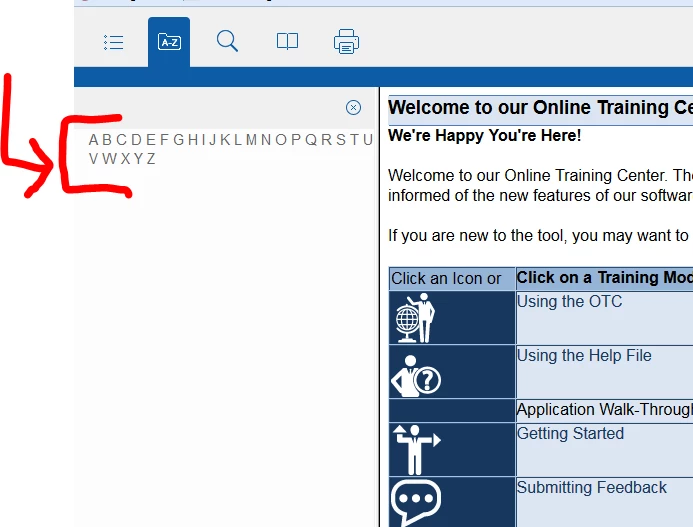
What I am actually seeing, is this
1. The back/forward icons are missing
2. The "Content Category" drop down list is missing. (We wont use this, by intent.)
3. The "Sync ToC" button is missing.
4. The Input field for the Index is replaced with the alphabet
~~~~~~~~~~~~~~~~~~~~~~~~~~~~~~~~~~~~~~~~~~~~~~~~~~~~~~~~~~~~~~~~~~~~~~~~~~~~~~~~~~~~~~~~~~~~~~~~~~~~~~~~~~~~~~~~~~~~~
Problem #3. Search Missing buttons and Input field. Replaced with Letters
When you go to look at the Search, what I should be seeing, is this
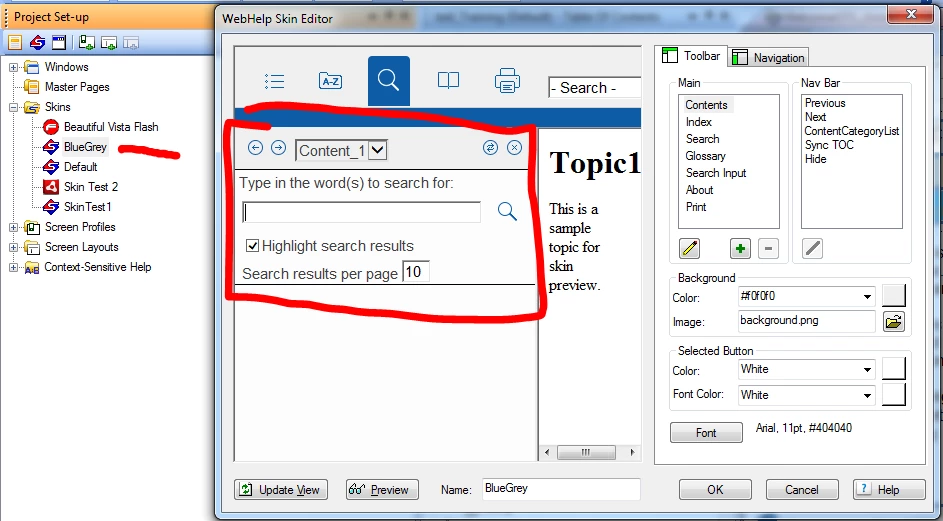
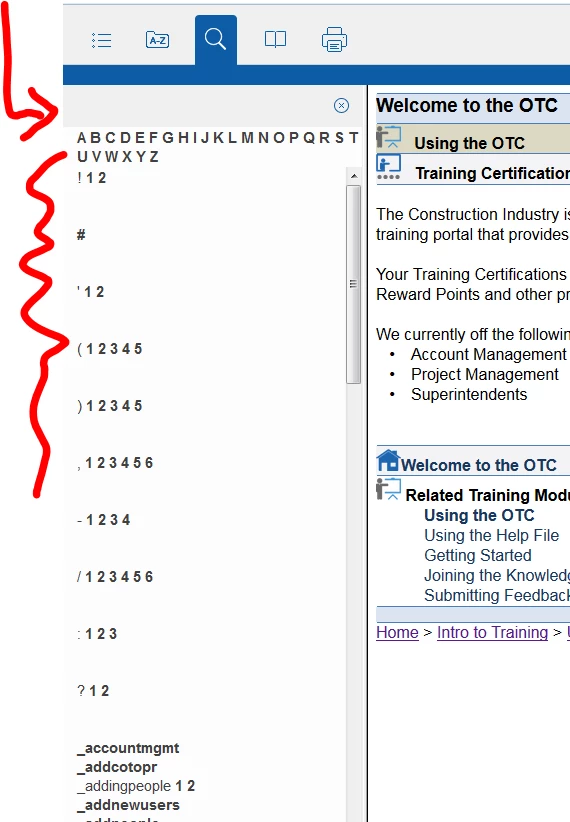
What I am actually seeing, is this
1. The back/forward icons are missing
2. The "Content Category" drop down list is missing. (We wont use this, by intent.)
3. The "Sync ToC" button is missing.
4. The Input field for the Index is replaced with the alphabet
5. The checkbox for highlight search results is missing
6. Search results per page is missing
~~~~~~~~~~~~~~~~~~~~~~~~~~~~~~~~~~~~~~~~~~~~~~~~~~~~~~~~~~~~~~~~~~~~~~~~~~~~~~~~~~~~~~~~~~~~~~~~~~~~~~~~~~~~~~~~~~~~~
Problem #4. Glossary. Missing buttons and Terms list. Replaced with Letters
When you go to look at the Glossary, what I should be seeing, is this
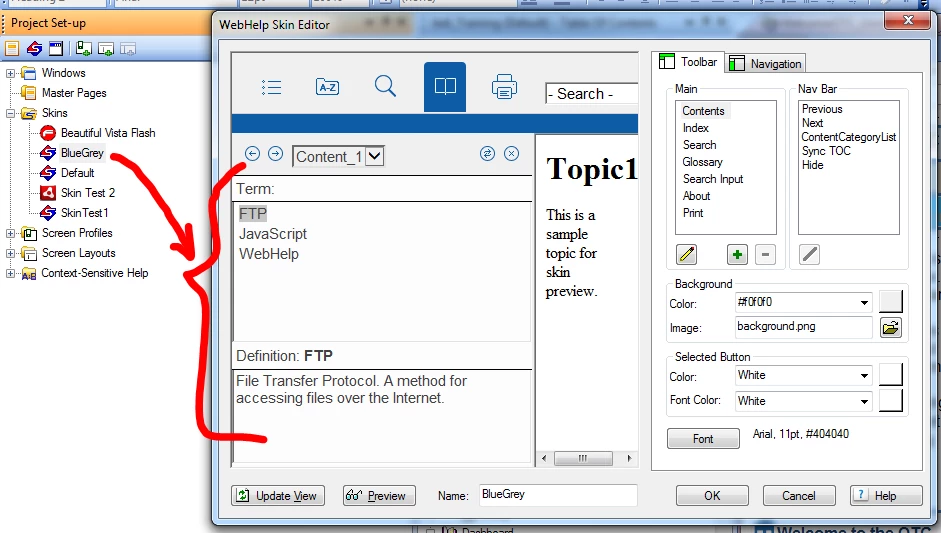
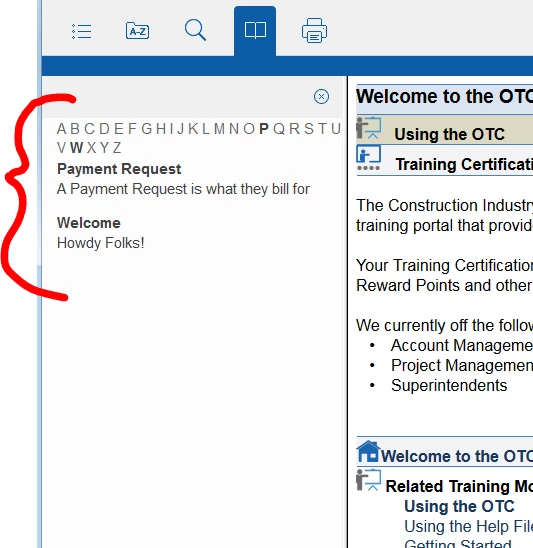
What I am actually seeing, is this
1. The back/forward icons are missing
2. The "Content Category" drop down list is missing. (We wont use this, by intent.)
3. The "Sync ToC" button is missing.
4. The Terms list is missing and so is the definition display area.
5. This is replaced with the alphabet, and a string of Glossary terms and definitions that is always displayed.
~~~~~~~~~~~~~~~~~~~~~~~~~~~~~~~~~~~~~~~~~~~~~~~~~~~~~~~~~~~~~~~~~~~~~~~~~~~~~~~~~~~~~~~~~~~~~~~~~~~~~~~~~~~~~~~~~~~~~
Problem #5. Print.
Im not entirely sure what this is supposed to even be doing, but I am assuming it is visible on the toolbar for a reason. However, it doesnt display anything or do anything.
~~~~~~~~~~~~~~~~~~~~~~~~~~~~~~~~~~~~~~~~~~~~~~~~~~~~~~~~~~~~~~~~~~~~~~~~~~~~~~~~~~~~~~~~~~~~~~~~~~~~~~~~~~~~~~~~~~~~~
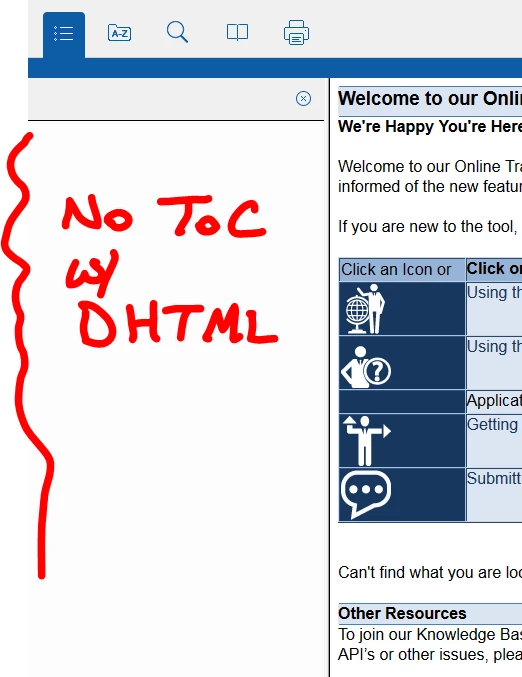
Problem #6. Choosing DHTML Format
As I mentioned at the beginning.... these problems go away if I choose DHTML format. BUT, then I lose my Table of Contents, and nothing I have tried seems to bring it back.


 AdChoices