
Link Frameless Topic Page Button to Topic Page (Merged Help)
I am having an issue where my site is prompting for a login like the help site being called anew when a custom Topic Page Button link is clicked.
Version: RH 2019 New UI (latest update)
I am following Peter Grainge’s rules on merged help and ZoomSearch.
Created a new frameless output, and imported help topics from classic UI. I have been able to generate and use the help successfully with HTML5 & Frameless skin.
This is a merged help project with child projects in the parent:
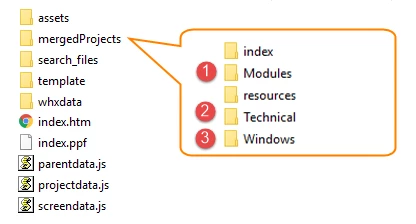
I generated ZoomSearch files and page in the search_files folder in the parent.
The Frameless skin is imported into Parent & Child projects before generating output, so they are all using the same skin.
I need search.html to be available from every page in the help (including merged children).
On the Frameless skin, I replaced the Topic Page Button for Search to go to the Zoom search page, and this is where I’m running into issues.
- I cannot define an absolute path. The site is uploaded to 2 domains (test & production), so the link must be root relative.
- Link field: Does not appear to work the same way the “Custom URL” field worked in HTML5 layouts. In previous versions, I could enter a relative path (/search_files/search.html) in the field.
Could I enter some data here to get to the topic?
- OnClick field: window.open("/OnlineHelp/search_files/search.html", "_self")
(Or should it open to _parent?)
- On Local Host, I can do this without issue.
- Page opens from parent and child topics inside the help “wrapper”
- Clicking a result opens in the help
- Clicking Back on browser bar opens last results in the help
- Once I upload to the domain, this solution prompts for a login (but the token should be good for 1 hour).
I am wondering how I can get that link to open the search page without "reloading" the site, which is what is causing the auth token to refresh.


 AdChoices