
November 12, 2012
Answered

Link to RH topics from embedded Captivate slide?

  • November 12, 2012
  • 11 replies
  • 1256 views

RH10, WebHelp, Captivate 6

Hi,

I've been using RH for years, but I'm new at Captivate.

I want to have a rollover effect in a WebHelp topic, whereby the user can hover the mouse pointer over a graphic and a window will pop up. Inside the pop-up window will be hyperlinks to topics within the same WebHelp project.

My understanding so far is that I can insert a Captivate slide in WebHelp topic to achieve this. The Captivate slide would contain the background graphic, and a "rollover slidelet".

My question is, at what point do I create the hyperlinks to WebHelp topics  in the slidelet? Must I do this in Captivate, and if so how do I specify the target path of the link?

Or can I do this linking after I embed the Captivate slide and slidelet into the WebHelp project?
    This topic is closed to new replies. Start a new post to keep the conversation going.
    Correct answer Captiv8r

    Hmmm, for some reason I keep forgetting they added that capability to Captivate 6.

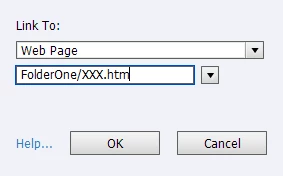
    Okay then, what you have to do is consider where the Captivate movie will be (as in what folder) at the time it is presented within the WebHelp. So if you are linking to topic XXX.htm and inside RoboHelp, that topic is inside a folder named FolderOne, it's going to depend on the folder the Captivate movie is in. Often, they are inserted at the project root. So if this turns out to be the case, you would insert the following into the field:

    FolderOne/XXX.htm

    I'll give my theory a try and see if it works for me.

    Keep in mind that the links will likely fail when you test locally unless you add the project location to the list of trusted locations for the Flash Player.

    Cheers... Rick

    11 replies

    November 14, 2012

    So far I have used this method successfully with hyperlinked text and with a hyperlinked image.

    OK I may be pushing my luck here, but can I run the mouseover from an image map within a larger image? How would the tweaked HTML look?

    Thanks,

    Mike

    Captiv8r
    Legend
    November 12, 2012

    Hi there

    While you would certainly create a slide inside a Captivate project, you don't insert a Captivate slide into a RoboHelp topic. You must publish the Captivate project to create a SWF. Then you insert the SWF into the RoboHelp topic.

    I do see a fly in the ointment here. And that big ole fly is that you cannot insert a clickable object into a Slidelet. So that would likely be a non-starter. Sorry.

    I think your best bet would be to try and use a Related Topics control. Then try and modify the script so it doesn't need to be clicked to activate the popup, but instead trigger the popup on mouseover.

    Cheers... Rick

    November 12, 2012

    Hi Rick -- was hoping you'd be out there. It does appear that I can insert a text hyperlink on the slidelet, looking at the Properties > Format tab. This might work, but again I don't know how to create the URL so that it calls up another WebHelp topic when the SWF is embedded in a WebHelp topic.

    Captiv8r
    Captiv8rCorrect answer
    Legend
    November 12, 2012

    Hmmm, for some reason I keep forgetting they added that capability to Captivate 6.

    Okay then, what you have to do is consider where the Captivate movie will be (as in what folder) at the time it is presented within the WebHelp. So if you are linking to topic XXX.htm and inside RoboHelp, that topic is inside a folder named FolderOne, it's going to depend on the folder the Captivate movie is in. Often, they are inserted at the project root. So if this turns out to be the case, you would insert the following into the field:

    FolderOne/XXX.htm

    I'll give my theory a try and see if it works for me.

    Keep in mind that the links will likely fail when you test locally unless you add the project location to the list of trusted locations for the Flash Player.

    Cheers... Rick