January 30, 2013
Answered

Linking from a RH9 topic to an external file

  • January 30, 2013
  • 13 replies
  • 1539 views

I'm trying to create a link from within a RoboHelp 9 HTML CHM file to an .html file that is external to the CHM.  The file I am linking to is an index for a group of Wiki files that are stored in a folder within the help directory that is stored in the root path of our product.  I am using a relative path and the links work in the RH preview window, but not after the .chm has been generated.

Any suggestions or clues are very welcome!

This topic is closed to new replies. Start a new post to keep the conversation going.
Correct answer Captiv8r

So sorry, Rick, I had just written to someone else and hadn’t cleared his name out of my mental “cache”! 

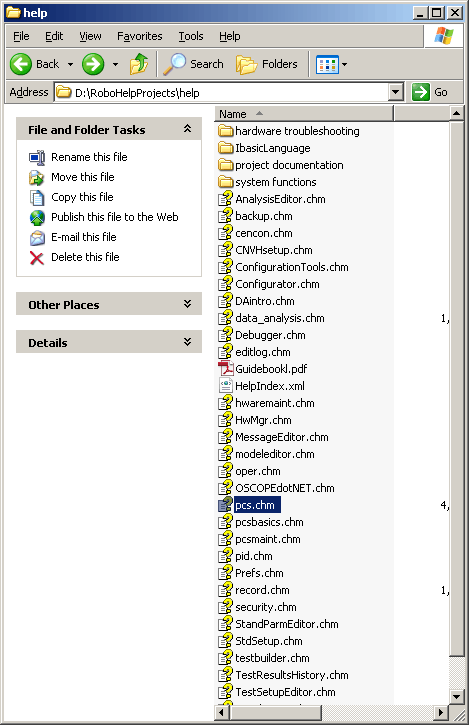
I am actually creating three separate links (in the pcs.chm), each to a file named index.html, in a three different subfolders stored in the Help directory (pictured below).  So, I am trying to use relative links to the individual folders (hardware troubleshooting, ibasicLanguage, and system functions).  Can I pasted the relative link directly in the “Program to open” line?   

I hope I made sense.

Yes, the link might look like this: system functions/index.htm

While that *SHOULD* work, there are a couple of possible "gotchas".

1. The space in the folder name might cause a linking problem. If you have any influence over the naming, you might consider eliminating the space just to be on the safe side.

2. Depending on how the CHM is launched, the actual path may change a bit. For some reason when an application opens a CHM file the path gets wonky. That's where you need JavaScript code to deduce the actual path.

Cheers... Rick

13 replies

Captiv8r
Legend
January 30, 2013

Hi there

Likely, you will need to use a Shortcut control inside the CHM to open the file.

Question here. Is the CHM called from an application? My reason for asking is because if it is, sometimes the pathing becomes horked. (yeah, horked is a technical term. LOL)

You may find you need to employ the javascript outlined at the link below in order to make it work.

Click here to view

Cheers... Rick

January 30, 2013

Thanks, Rick!

I think you recommended this same approach a few years ago and I remember it working. I’m feeling a little dumb right now and just cannot remember how to fill out the shortcut wizard to have it access the html file. Can you point me to a tutorial or some instructions?
