
Known Participant
May 23, 2013
Question

Linking to "book with link" topics

  • May 23, 2013
  • 1 reply
  • 600 views

Hi Everyone,

In RH10, is it possible to link to a topic that is a "book with link" topic and have the book topic expand in the TOC?

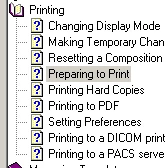
If you link to a normal topic with the "Autosynchronise TOC" option switched on, the destination topic in the TOC is highlighted in grey and the book is expanded like this:
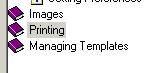
However if I link to the Printing book topic, the book looks like this:
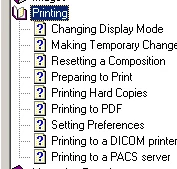
But I'd like it to look like this:
Can this be done?

Many thanks in advance.

Cheers,

Andy

This topic has been closed for replies.

1 reply

Captiv8r
Legend
May 23, 2013

Hi Andy

You could accomplish it by creating a topic known as a "redirect" topic. Essentially you would insert a meta tag into the HTML of the topic that looks like this:

<meta HTTP-EQUIV=refresh CONTENT="0;URL=Topic_Name.htm">

This gets inserted in that area at the top of the code. Somewhere (doesn't matter where) between the <head> and </head> tags.

Then configure the Topic_Name.htm to point to the first topic inside the book.

Cheers... Rick

TA_AndyAuthor
Known Participant
May 24, 2013

Thank you Rick.

Apologies if I'm being obtuse here, but I don't fully understand your suggestion.

>> You could accomplish it by creating a topic known as a "redirect" topic.

Do you mean the source topic links to the redirect topic, which in turn "links" to the destination book topic via the meta tag?

Cheers,

Andy

Captiv8r
Legend
May 24, 2013

Hi Andy

Create a topic that has no content inside it. Amend it per my instructions above. Then link the book to that topic.

When the user clicks the book, it should then in turn load the redirect topic. The redirect topic should then cause the first topic inside the book to open. Assuming your TOC has been configured to sync to the displayed topic, all should work.

Cheers... Rick