
Inspiring
July 10, 2009
Answered

List items have no <p> tag in RH8

  • July 10, 2009
  • 3 replies
  • 726 views

I'm probably being incredibly dense, it is Friday afternoon after all, but I'd welcome answers with or without flames.

Using RoboHelp for HTML 8 under Windows XP SP3, not on a network.

When I create a bulleted list using the toolbar button
the style tag changes from "Normal" to "(none)"
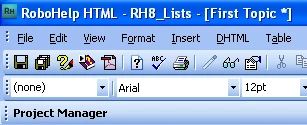
... and this messes up my formatting.

Looking in the HTML I see that the <p></p> tags have disappeared;
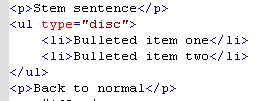
This did not happen in RH7.

Am I doing something wrong, and if so what?

--- Derek

This topic has been closed for replies.
Correct answer RoboWizard

Hi there

You aren't doing anything wrong. This is one of the changes that comes with RoboHelp 8.

Likely you need to open the Styles designer and define the style for your list items.

Personally, I prefer to see the larger view of the Style designer. You get different views in RoboHelp 8 depending on how it's opened.

I typically right-click the editor and choose Topic Properties. Then click the Appearance tab and finally the Edit... button.

Cheers... Rick

Helpful and Handy Links

3 replies

Inspiring
July 13, 2009

Thanks guys, I'll adapt the CSS.

--- Derek

Peter Grainge
Community Expert
Community Expert
July 13, 2009

If you use printed documentation from RH, make sure the output there is OK.


See www.grainge.org for RoboHelp and Authoring tips

Use the menu (bottom right) to mark the Best Answer or Highlight particularly useful replies. Found the answer elsewhere? Share it here.
Peter Grainge
Community Expert
Community Expert
July 10, 2009

No you are not doing anything wrong, it's just that RH8 has brought things more into the way of HTML editing where list styles should be defined in the OL UL and LI tags. This is the way Dreamweaver works.

See the List and Tables pages at http://www.grainge.org/pages/authoring/rh_tour/index.htm


See www.grainge.org for RoboHelp and Authoring tips

Use the menu (bottom right) to mark the Best Answer or Highlight particularly useful replies. Found the answer elsewhere? Share it here.
RoboWizard
RoboWizardCorrect answer
Inspiring
July 10, 2009

Hi there

You aren't doing anything wrong. This is one of the changes that comes with RoboHelp 8.

Likely you need to open the Styles designer and define the style for your list items.

Personally, I prefer to see the larger view of the Style designer. You get different views in RoboHelp 8 depending on how it's opened.

I typically right-click the editor and choose Topic Properties. Then click the Appearance tab and finally the Edit... button.

Cheers... Rick

Helpful and Handy Links