


Inspiring
February 28, 2022
Answered

List style when importing MS Word (RH 2020.6.76)

  • February 28, 2022
  • 2 replies
  • 216 views

Hi, Everyone.


When I import a MS Word doc, in the Word Import Settings dialog, there's no list style to map to, even though my CSS contains a half-dozen list styles. So I'm forced to choose "Use RoboHelp Default." And that gets imported as "p" style.


Similarly, there's also no hyperlink style to map to. 


The other major problem is inline margin styling from the MS Word file is getting imported (see screenshot), even though I leave un-selected "Import inline styles."
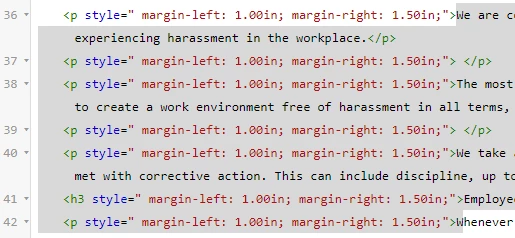


I've worked with Adobe TCS Support on these issues. But they recommend importing styles, which I don't want to do b/c I'm trying to keep the HTML clean.


Thank you!

 

    This topic has been closed for replies.
    Correct answer Peter Grainge

    You can select the list and use the Clear Formatting icon in Content Properties, then apply a list style. 

    ________________________________________________________
    My site www.grainge.org includes many free Authoring and RoboHelp resources that may be of help.


    2 replies

    Inspiring
    February 28, 2022

    Wonderful! That works!  Works for my other issue, too (inline margin styling getting imported).


    Thanks so much, Peter!


    Peter Grainge
    Community Expert
    Peter GraingeCommunity ExpertCorrect answer
    Community Expert
    February 28, 2022

    You can select the list and use the Clear Formatting icon in Content Properties, then apply a list style. 

    ________________________________________________________
    My site www.grainge.org includes many free Authoring and RoboHelp resources that may be of help.


    Use the menu (bottom right) to mark the Best Answer or Highlight particularly useful replies. Found the answer elsewhere? Share it here.