
Inspiring
November 8, 2010
Question

List using normal style numbers incorrectly when list type changes at the same level

  • November 8, 2010
  • 1 reply
  • 1030 views

I have a project where I do not use list styles. So, I use the standard <ul><ol><li> tags using the type attribute, and apply the normal style only. This works pretty well except when I have a list that uses different bullets or numbering at the same level.

e.g. HTML CODE

<ol type="1">
<li><p>asdfasdfasdf</p></li>
<li><p>asdfasdfsdf</p></li>
<ol type="a">
  <li><p>asdfasdf</p></li>
  <ul type="disc">Note: 3rd level list using disc bullet format
   <li><p>asdf</p></li>
   <li><p>asdfasdfasdf</p></li>
  </ul>
  <li><p>asdf</p></li>
  <ol type="i"> Note: 3rd level list using i, ii, iii format

   <li><p>sdf</p></li>
   <li><p>sdf</p></li>
  </ol>
  <li><p>aksdfkljasf</p></li>
  <ol type="a">
   <li type="i"><p>asdfj;kldfj</p></li>
   <li type="i"><p>askfjklf</p></li>
  </ol>
  <li><p>asdfkjsf</p></li>
  <li><p>sadfkjf</p></li>
</ol>
<li><p>asdfasdfsdf</p></li>
<li><p>asdfasdfdf</p></li>
</ol>

PRINTED OUTPUT
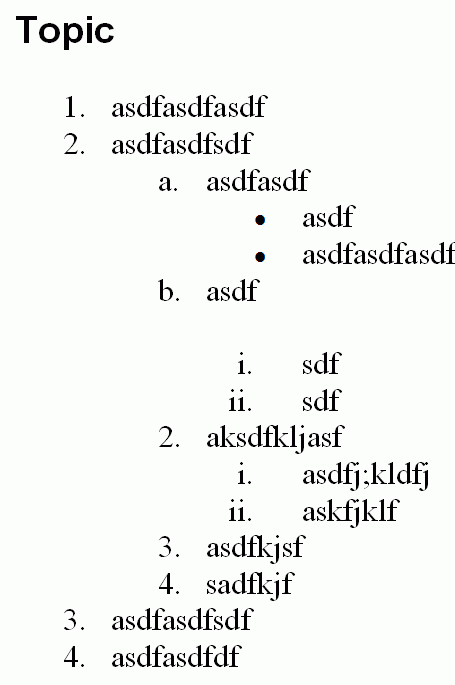
Note that it gets the 3rd level list types correct, but that it messes up the second level lists (a, b, 2, 3, 4).

As you can see above, I can replicate this in both a large project and a single topic project.

I'm wondering if this is a known limitation, and if so, can anyone point me to the simplest workaround?

This topic has been closed for replies.

1 reply

Willam van Weelden
Inspiring
November 9, 2010

Hi,

Which version of RoboHelp are you using? I tested in RH7 and RH8 but I can't reproduce your problem. Does it show correct in RoboHelp?

A minor thing: your lists are invalid html. The correct syntax for nested lists is:

<ul>

   <li>First level

      <ul>

         <li>Second level</li>

         <li>Second level

            <ul>

               <li>Third level</li>

            </ul>

         </li>

         <li>Second level</li>

      </ul>

   </li>

   <li>First level</li>

</ul>

Greet,

Willam

Inspiring
November 9, 2010

Thanks for your suggestions.

I'm using Robohelp 8.

I have always thought that what you suggested was the correct syntax... however:

- if I just type the text I want into the design tab in robohelp, the format I originally posted is the default HTML it generates.

- when I output to printed documentation with the correct nested format, I get even more anomolies, and it doesn't handle conditional build tags very well. (i.e. lots of content that looks like it is tagged to be not included shows up in the printed documentation).

So, I've been using the default HTML that robohelp generates.

I did try the correct HTML for nested lists in this simple topic without conditional build tags.

<ol type="1">
<li><p>asdfasdfasdf</p></li>
<li><p>asdfasdfsdf</p>
<ol type="a">
  <li><p>asdfasdf</p>
  <ul type="disc">
   <li><p>asdf</p></li>
   <li><p>asdfasdfasdf</p></li>
  </ul></li>
  <li><p>asdf</p>
  <ol type="i">
   <li><p>sdf</p></li>
   <li><p>sdf</p></li>
  </ol></li>
  <li><p>aksdfkljasf</p>
  <ol type="a">
   <li type="i"><p>asdfj;kldfj</p></li>
   <li type="i"><p>askfjklf</p></li>
  </ol></li>
  <li><p>asdfkjsf</p></li>
  <li><p>sadfkjf</p></li>
</ol></li>
<li><p>asdfasdfsdf</p></li>
<li><p>asdfasdfdf</p></li>
</ol>

The printed documentation looks like this:

I should also note that HTMLHelp comes out fine.

Perhaps you could share your files where you couldn't reproduce the problem, and I can work backwards to see where the problem is for me?

Willam van Weelden
Inspiring
November 10, 2010

Hi,

- If you use the WYSIWYG, RH does produce invalid HTML. Annoying isn't it?


- I haven't tried conditional build tags. I created a blank project and pasted your code in the first topic and generated printed documentation. Nothing fancy. What happens if you create a new project and add the list without conditional build tags? If that is correct, try adding the conditional tags one by one to see where it breaks.

Greet,

Willam