


Question
Little red "x" on TOC in editing pane
Hi Everyone.
Sorry to be peppering you all with questions today! There's a little red "x" when viewing my TOC in the TOC editing pane:
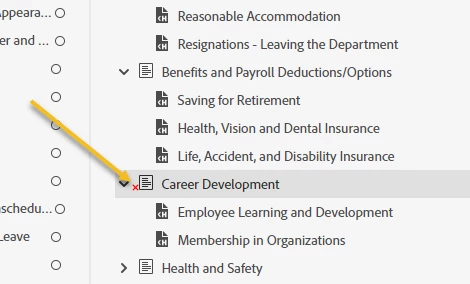
What does that red x mean?
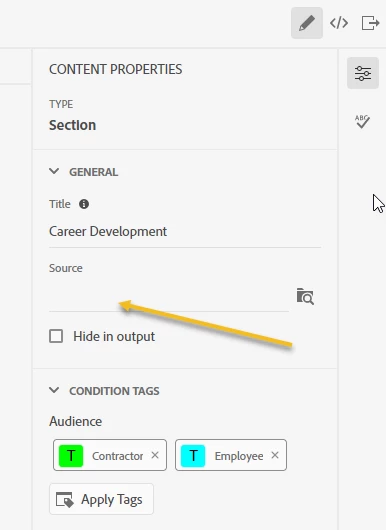
I know how it got there. In Content Properties (General tab), I've just deleted the name of the topic that had been linked as the "Source" (i.e., Source is now blank):
The reason I've left it blank is that, previously, the Source of that the TOC Book was linked to was the 1st page underneath it in the TOC:
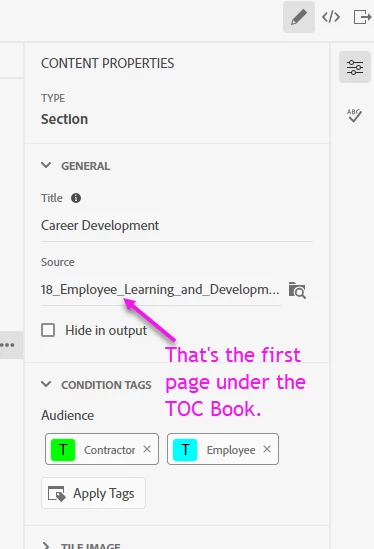
The red x disappeared from the TOC editor. However, this caused the Main TOC of my help site to disappear when clicking that page:
(See video here): https://documentcloud.adobe.com/link/track?uri=urn:aaid:scds:US:32204b56-77b4-4d21-b116-29412e26c9a2
Is the red "x" a problem?
 AdChoices