
Inspiring
February 12, 2020
Question

Lost Auto-numbering and Topic Properties Hangs in RH 2019 (Update 11)

  • February 12, 2020
  • 11 replies
  • 388 views

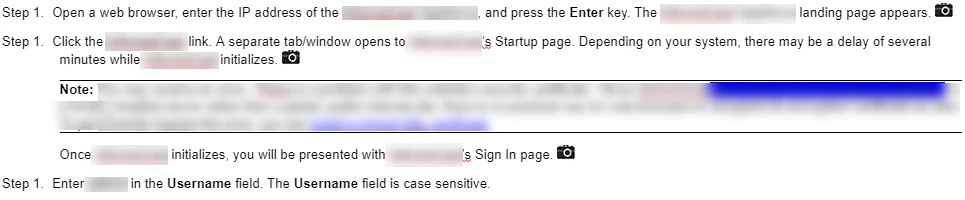
I just upgraded my RoboHelp Classic 2019 project to RH 2019, update 11. The upgrade went fine, but all of my topics lost their auto-numbered steps: 
 

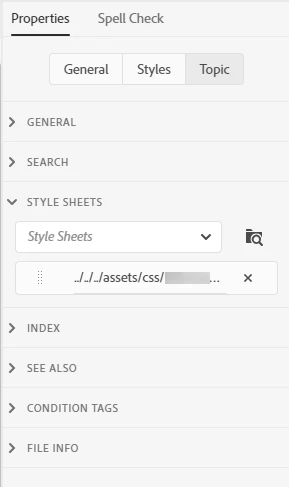
When I click the Topic tab under Properties, RH hangs for several minutes before displaying the Topic Properties:
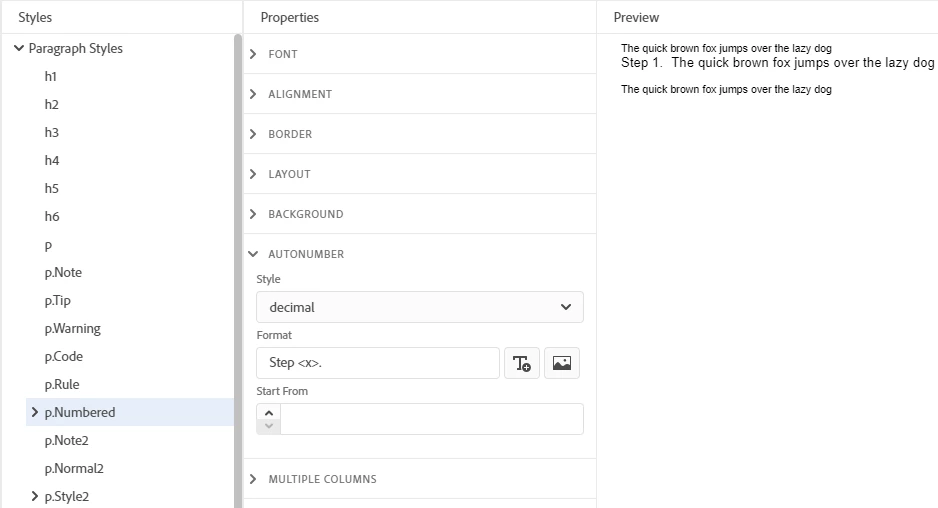
Once I'm able to double check that the correct CSS is applied (and it is), checking the autonumbering for the paragraph doesn't seem to reveal why all steps are listed as Step 1: 
Is there a fix for the slow response time for Topic Properties and my autonumbering? Thank you.

This topic has been closed for replies.

11 replies

Peter Grainge
Community Expert
Community Expert
June 23, 2020

There are various issues in this thread. It would be better to start a new one and describe the issue fully there as it applies to you.


Use the menu (bottom right) to mark the Best Answer or Highlight particularly useful replies. Found the answer elsewhere? Share it here.
Peter Grainge
Community Expert
Community Expert
February 13, 2020

Wow. I haven't seen anything work that slow. As you have shared the project with me I assume it's OK to share it with Adobe, it will not go any further than them. I will get back to you.


www.grainge.org

Use the menu (bottom right) to mark the Best Answer or Highlight particularly useful replies. Found the answer elsewhere? Share it here.
Inspiring
June 23, 2020

Any updates to report on this issue?


I also can't add a "1" to the Start field....when I add the number, it displays and then quickly disappears.

Peter Grainge
Community Expert
Community Expert
February 12, 2020

You are saying it wasn't like this previously but at the beginning you said you had just upgraded to 2019 New UI.


Can you share the project? If you can, then see the Contact page on my site and send the project as instructed there. Do make sure you include a link to this thread and please do not email the project direct.


I will see how it performs on my machine. It has to be something in your project if the sample is working OK.


It shouldn't make a difference but try it on a local drive first if it is not already there.


www.grainge.org

Use the menu (bottom right) to mark the Best Answer or Highlight particularly useful replies. Found the answer elsewhere? Share it here.
Inspiring
February 12, 2020

Thank you for investigating. Unfortunately, as it is now, RH 2019 is completely unusable for me because of the lag time. I have to be able to see the Topic tab and I can't wait two to three minutes in between. I tried upgrading from scratch again and it's the same. It was not like this previously, so I imagine one of Adobe's updates created this problem. 

Peter Grainge
Community Expert
Community Expert
February 12, 2020

I don't know what to advise here. It seems to project related.


I am not surprised the Start From field is not showing. The method is valid CSS3 supplied by Adobe but it's not built into RoboHelp.


www.grainge.org

Use the menu (bottom right) to mark the Best Answer or Highlight particularly useful replies. Found the answer elsewhere? Share it here.
Peter Grainge
Community Expert
Community Expert
February 12, 2020

I'll have to investigate that. Looks like the demo didn't upload. The sample project is OK and contains the information meantime.


www.grainge.org

Use the menu (bottom right) to mark the Best Answer or Highlight particularly useful replies. Found the answer elsewhere? Share it here.
Inspiring
February 12, 2020

One other note, switching between General and Styles works just fine. It's only clicking Topic that generates the hang time. 

Inspiring
February 12, 2020

Thank you, Peter. I am not having trouble with your sample projects. The Topic Properties appears just fine (no hang time) although the Start From field in your autonum-headings.css file is also blank (at least for me):

I just tried making a superficial change to my own CSS, reverting it, and saving it. That seems to have gotten my auto-numbering working again. I have no idea why. 


The Topic Properties is still slow though. I have upgraded before and never had this problem.

Jeff_Coatsworth
Community Expert
Community Expert
February 12, 2020

Busted link there Peter - it tries to hit http://www.grainge.org/demos/autonumber/d

Peter Grainge
Community Expert
Community Expert
February 12, 2020

I am not surprised as the HTML / CSS3 code behind 2019 New UI is fully compliant with those standards and I suspect before it was based on older rules. Assuming I am correct on that, then Autonumber works in a very different way. I have described it in Item 49 in Snippets on my site. http://www.grainge.org/pages/snippets/snippets.htm#miscellaneous


There is also a demo project to download so that you can see it working.


Please don't shoot the messenger.


I don't know why you are seeing slow performance as that hasn't really been an issue. Try one of the supplied sample projects to compare it with your project.


www.grainge.org

Use the menu (bottom right) to mark the Best Answer or Highlight particularly useful replies. Found the answer elsewhere? Share it here.