
Lost RSC connection to a file after branching
RSC 3.1, RH 8
We successfully branched a folder (two branches, one active, and one for archive snapshot only). A file in the active folder was apparently corrupted during the branching process, and does not appear in RSC. However, any attempt at editing the file results in this error message:
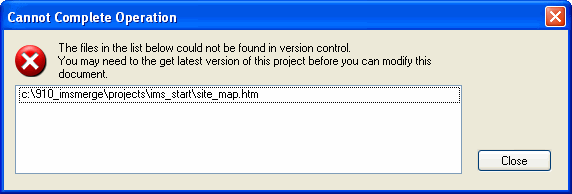
The file had additional HEAD info (shown in bold italic below) within the BODY area, interfering with the title and css info:
<?xml version="1.0" encoding="utf-8" ?>
<!DOCTYPE html PUBLIC "-//W3C//DTD XHTML 1.0 Transitional//EN" "http://www.w3.org/TR/xhtml1/DTD/xhtml1-transitional.dtd">
<html xmlns="http://www.w3.org/1999/xhtml">
<head>
<meta http-equiv="Content-Type" content="text/html; charset=utf-8" />
<meta name="generator" content="Adobe RoboHelp 8" />
<title></title>
</head>
<body>
<?xml version="1.0" encoding="utf-8" ?> <!DOCTYPE html PUBLIC "-//W3C//DTD XHTML 1.0 Transitional//EN" "http://www.w3.org/TR/xhtml1/DTD/xhtml1-transitional.dtd">
<html xmlns="http://www.w3.org/1999/xhtml">
<head>
<meta http-equiv="Content-Type" content="text/html; charset=utf-8" />
<meta name="generator" content="Adobe RoboHelp 8" />
<title>Charles River IMS Online Reference</title>
<link rel="StyleSheet" href="crd_start.css" type="text/css" />
</head>
<body>
Neither this file, nor a replacement uncorrupted version, can be edited. How can I get RSC to "remember" this file?
 AdChoices