
Answered
macOS Git Credential Manager authentication failed
Hi all! I'm having trouble getting RoboHelp connected to Bitbucket. I'd appreciate any help you can offer.
Environment
- MacBook Pro 13-inch, M1, 2020
- macOS Sonoma 14.5
- RoboHelp 2022.4.182
- git version 2.39.3 (Apple Git-146), part of Xcode command line tools
- Git Credential Manager 2.5.0+d34930736e131ad80e5690e5634ced1808aff3e2
- Atlassian Bitbucket v8.19.3 (this is a guess, based on footer text in /getting-started)
- zsh (default shell)
- I have not modified my default $PATH, but my company may have
What works
I created my working directory in the Finder and used git at the command line to init and set my name and email. Then I did git clone {my-repository-url}. This successfully popped up the Git Credential Manager GUI authentication screen, where I entered my username and an HTTP token from Bitbucket. The clone completed successfully.
What doesn't work
- I open the .rhpj file in RoboHelp
- Collaborate menu > New Connection…
- I populate this modal with exactly the same information that works without issues on my Windows 11 machine (running RoboHelp 2022.3.93).
- Collaborate > Add Project… > my project
- At this point, another instance of RoboHelp launches. It doesn't have any window, but it does have a menu bar, separate from the main instance of RoboHelp. Selecting About reveals a different version from the primary instance, 2022.4.0 (2022.4.0.214). It seems to invisibly cover up my Chrome browser—in other words, when I try to click into a Chrome window, the menu bar changes to RoboHelp and my click is not passed to Chrome.
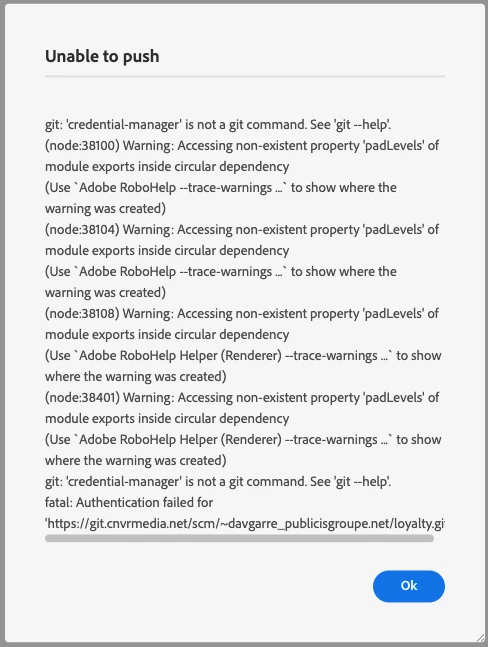
- That's as far as it gets. It hangs on Pushing Commit (I think) until I run out of patience, minutes or hours later. When I inevitably quit the headless instance of RoboHelp, I get a fairly large error message in the main instance that says Unable to push at the top and Authentication failed at the bottom.
Any and all suggestions welcome! I did call the main support number and we didn't get very far. I am working with my company's support team to contact the Adobe Enterprise Support folks, but maybe one of them will see this post!
Thanks,
Dave



 AdChoices