
Mapped topic names missing in Map ID dialog
Using Robohelp 10/FM11
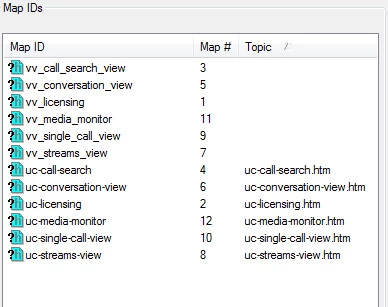
We recently noticed that some mappings in the All Map IDs dialog appear unmapped, but actually work properly. Specifically, the map ID is valid, but the topic name it's mapped to is not displayed in the dialog. That column is blank. The .h and .ali files appear to be fine. What's more, I noticed when I created a single sourced project from FM to RH, the markers I created manually work, but the matching topics are similarly "blank" in the dialog even though they are present in the .ali and .h, and the links work fine. The markers that RH creates for the individual chapter names actually do appear with topic titles, the markers i create to do not. Also, the topic properties only show the RH generated Map ID, not the one I created, but again the ones I created are in the adjunct files and seem to work.
The reason I am posting is that editing .h and .ali to verify mappings are correct is not trivial. We should be able to verify the mappings in the GUI. I would note that this did not seem to be an issue in RH9. I was able to generate the book and see that my IDs mapped across properly by examining them in the Map ID GUI.
It is not clear to me what could have changed in RH10 to prevent the GUI from displaying the mappings but this seems like a defect. I wondered if anyone else had encountered it and come up with a solution.
Here are some notes and a pic, from a small sample project, for reference:
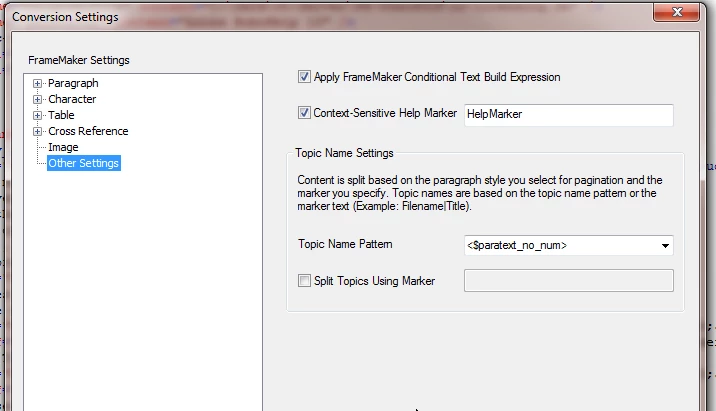
The vv_ tags come from the FM book as "HelpMarker" values
The MapID dialog looks like this...the book chapters are titled uc-foo.fm
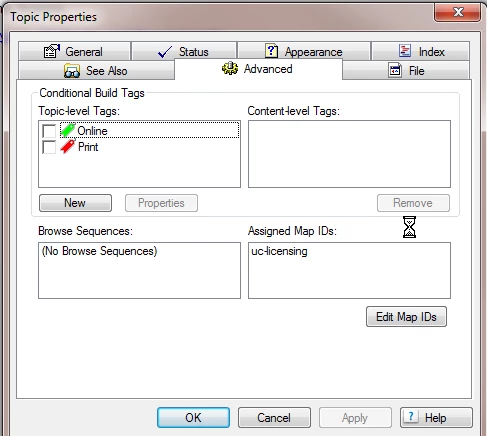
Here is an example of a topic that has the automatic "marker" for the chapter listed, but not my vv_licensing marker; see below that it does appear in the .ali file
Map IDs are automatically being assigned for my HelpMarkers
BSSCDefault.h:
#define vv_streams_view 7
#define vv_media_monitor 11
#define vv_licensing 1
#define vv_call_search_view 3
#define vv_conversation_view 5
#define vv_single_call_view 9
#define uc-licensing 2
#define uc-call-search 4
#define uc-conversation-view 6
#define uc-streams-view 8
#define uc-single-call-view 10
#define uc-media-monitor 12
The URLs are correct for the HelpMarkers -- why aren't these in the MapID Dialog above?????
Project.ali
<?xml version="1.0" encoding="utf-8"?>
<aliaslist version="1.0">
<alias name="vv_single_call_view" link="uc-help\uc-single-call-view\uc-single-call-view.htm#CSH_1">
</alias>
<alias name="vv_call_search_view" link="uc-help\uc-call-search\uc-call-search.htm#CSH_1">
</alias>
<alias name="vv_conversation_view" link="uc-help\uc-conversation-view\uc-conversation-view.htm#CSH_1">
</alias>
<alias name="vv_streams_view" link="uc-help\uc-streams-view\uc-streams-view.htm#CSH_1">
</alias>
<alias name="uc-call-search" link="uc-help\uc-call-search\uc-call-search.htm">
</alias>
<alias name="vv_licensing" link="uc-help\uc-licensing\uc-licensing.htm#CSH_1"> <-- note that these HelpMarker IDs do not appear in Topic Properties, as illustrated in above screenshot
</alias>
<alias name="uc-conversation-view" link="uc-help\uc-conversation-view\uc-conversation-view.htm">
</alias>
<alias name="vv_media_monitor" link="uc-help\uc-media-monitor\uc-media-monitor.htm#CSH_1">
</alias>
<alias name="uc-licensing" link="uc-help\uc-licensing\uc-licensing.htm">
</alias>
<alias name="uc-streams-view" link="uc-help\uc-streams-view\uc-streams-view.htm">
</alias>
<alias name="uc-single-call-view" link="uc-help\uc-single-call-view\uc-single-call-view.htm">
</alias>
<alias name="uc-media-monitor" link="uc-help\uc-media-monitor\uc-media-monitor.htm">
</alias>
</aliaslist>


 AdChoices