Inspiring
January 27, 2010
Question

Master page not appearing in Project Set-up or in New Topic

  • January 27, 2010
  • 2 replies
  • 1663 views

I am using RoboHelp 8.0.2 and working on a local drive.

My project and the template was imported from RoboHelp 6.

The master page is not appearing the Project Set-Up even though it's in use in the project:
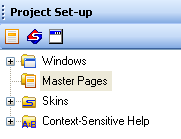
It also does not appear when I create a New Topic, so for each new topic I then have to go to the directory and select it. (It appears in the project's directory.)
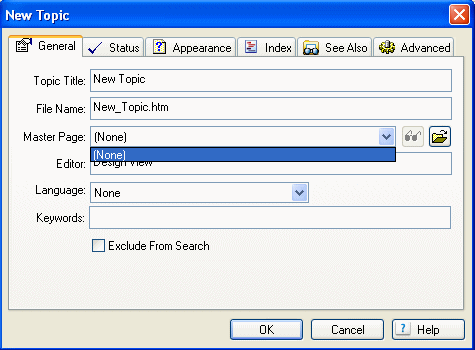
It's used by every topic in my project and if I try to create a new Master Page with the same name, I get a message that this Master Page already exists.

Any ideas?

Thanks,

Debbie

    This topic has been closed for replies.

    2 replies

    August 5, 2010

    I have the very same problem.  (Also using Robo8)  My master page list is empty, even though every topic in the project is using the same template.  When I try to  import the template from another project, it says it already exists.  When I look for it using Explorer, I can easily find it.  So, basically I am unable to modify the master page because it won't show up in the Project Set-up pod.  I have multiple projects using the same template, so I don't want to create a new one from scratch and apply to every topic.  But right now I don't see an alternative.

    Captiv8r
    Legend
    August 6, 2010

    Hello and welcome to our community

    One way to overcome this is to save the Master Page file using a variation on the file name. Then import it into the project and associate the new Master Page with all the topics.

    This is easily done using the Topic List.

    Cheers... Rick

    Helpful and Handy Links

    RoboHelp Wish Form/Bug Reporting Form

    Begin learning RoboHelp HTML 7 or 8 moments from now - $24.95!

    Adobe Certified RoboHelp HTML Training

    SorcererStone Blog

    RoboHelp eBooks

    RoboColum_n_
    Legend
    January 27, 2010

    Hi Debbie.

    Make sure you have saved your project and if the master page still isn't there, close the project and rename its .CPD file. If that still doesn't work, I'd try creating the master page from scratch. There is obviously something inside the old template that is causing RH to choke. Recreating it may be the easyiest option.


    • Read the RoboColum(n) for a tips, tricks and musings on the Technical Communication Suite products.
    • Follow the RoboColum(n) on Twitter
    Peter Grainge
    Community Expert
    Community Expert
    January 27, 2010

    Maybe it's like a topic that drops out of Project Manager and you just need to import it back?


    See www.grainge.org for RoboHelp and Authoring tips

    Follow me @petergrainge

    Use the menu (bottom right) to mark the Best Answer or Highlight particularly useful replies. Found the answer elsewhere? Share it here.
    dsarigAuthor
    Inspiring
    January 28, 2010

    I have tried importing the master page many times and it doesn't work. The only way for me to edit the master page is to import it and then it appears in the RoboHelp Editor where I can edit it.

    I renamed the cpd and that didn't help.

    I created a new Master Page (which does appear in the Project Set-up pane), assigned the new Master Page to all topics. I deleted the old Master Page (which is named functions.htt). I then tried to rename the new one with the name functions.htt, but I get the message - "The name funcions.htt is already in use by a file or a folder".

    I'd rather not use a new Master Page name, because in some of my projects it appears 1,000s of times.