


Daedalus321
Known Participant
Jan 20, 2017 3:36 PM UTC
Question

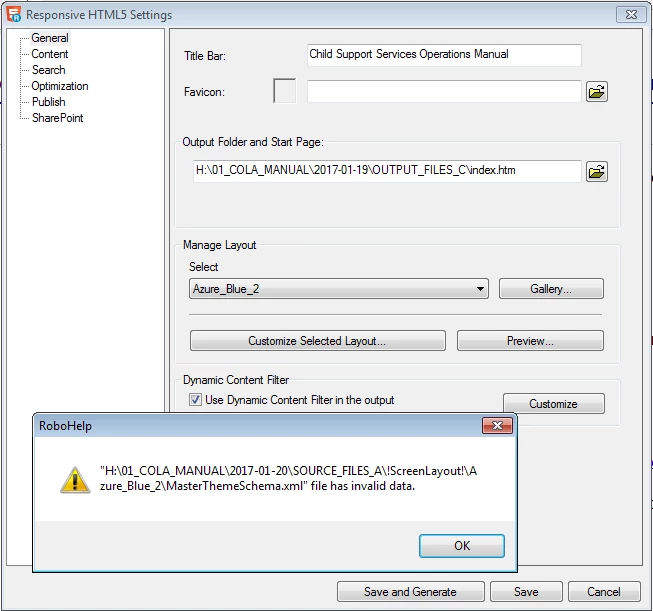
MasterThemeSchema.xml file has invalid data

Hi Everyone,

When attempting to Customize the layout for Responsive HTML5 output, I get stonewalled by an error message saying that the "MasterThemeSchema.xml" file has invalid data.

What can I do about this?

My ultimate goals here, really, is to:

Change the navigation icons for TOC, glossary, index, etc. from icons into buttons with the actual WORDS "Contents," "Glossary," etc.

(Is this accomplished through changing the skin? I see something about this on RoboWizard site, but it seems to apply to WebHelp output, rather than HTML5 output.)

But, I need to solve this "invalid data" problem in and of itself, as well.

Thanks,

Mark
This topic is closed to new replies. Start a new post to keep the conversation going.

1 reply

Captiv8r
Legend
Jan 20, 2017 4:21 PM UTC

Hi there

Are you trying to customize these buttons by working in the RoboHelp Output Setup pod? If so, you need to abandon that. It's a horrible way to do it. Instead, use that button in the Responsive HTML 5 recipe card labeled "Customize Selected Layout" and work through the dialog that presents.

If you are already trying this by using the dialog and way I mentioned, I'm at a bit of a loss as to what to tell you. Other than to suggest you report it to Adobe as a bug.

Click here to begin to report a bug

Cheers... Rick

Translate