May 11, 2011
Answered

Microsoft HTML Help - missing expand icon in TOC
  • May 11, 2011
  • 2 replies
  • 592 views

Hello,

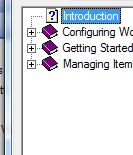
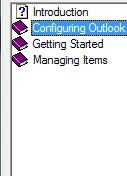
The expand icon (+) is suddenly no longer displayed in the toc when I generate a Microsoft HTML Help output. I can still double click books to expand them and see the underlying topics...but no + icon.

I've attached a couple of screenshots of what's happening and what should be happening.


Can anyone help me to get this icon back?

Thanks!

    This topic has been closed for replies.
    Correct answer Captiv8r

    Hi there

    Examine your SSL properties and click the Edit button next to Advanced Settings. Then the TOC tab. Enable Lines from Root and you may then enable the Plus/Minus signs.

    Cheers... Rick

    Helpful and Handy Links

    RoboHelp Wish Form/Bug Reporting Form

    Begin learning RoboHelp HTML 7, 8 or 9 within the day!

    Adobe Certified RoboHelp HTML Training

    SorcerStone Blog

    RoboHelp eBooks

    2 replies

    May 11, 2011

    Ahh not to worry - just discovered the answer in the Advanced settings

    May 11, 2011

    Oh thanks Rick just saw your answer that was quick!

    Captiv8r
    Captiv8rCorrect answer
    Legend
    May 11, 2011

    Hi there

    Examine your SSL properties and click the Edit button next to Advanced Settings. Then the TOC tab. Enable Lines from Root and you may then enable the Plus/Minus signs.

    Cheers... Rick

    Helpful and Handy Links

    RoboHelp Wish Form/Bug Reporting Form

    Begin learning RoboHelp HTML 7, 8 or 9 within the day!

    Adobe Certified RoboHelp HTML Training

    SorcerStone Blog

    RoboHelp eBooks