
June 17, 2010
Question

Microsoft Visual Basic error '5155'

  • June 17, 2010
  • 1 reply
  • 2747 views

Hi team,

I got this message when i try to add a new document word (doc file) in my robohelp explorer before adding Topics.
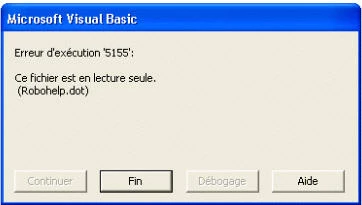
I work with robohelp 8 for word, with microsoft word 2007.

Robohelp is installed on a server (disk c:) and the project is on a drive like i:.

Some of you can help me.

some1no

This topic has been closed for replies.

1 reply

RoboColum_n_
Legend
June 18, 2010

First of all RoboHelp should not be installed on a server as this invalidates the licence agreement. Secondly try moving your project from the network drive to a local drive.


  • Read the RoboColum(n) for a tips, tricks and musings on the Technical Communication Suite products.
  • Follow the RoboColum(n) on Twitter
June 18, 2010

Hi Colum,

I made my homework and ask to my tech staff here to understand how it is install. And it work this way:

We use virtual session and this we we work as we are on a local machine where we could find a drive C:\, commun at other machine like me at home. The product is on C:\Program Files\Adobe. AT the time I wrote my question, I was unable to access in write mode this folder, because all installation made here protect the native folder by admin password and we are only in way to access in read only.

For the second information, my folder we're is my normal.dot and robohelp.dot is on a netdrive access by the letter Y:\, like this y:\AideContextuelle\DOTRh8.

Now I ask to my TI to give me read/write on the folder C:\Program Files\Adobe and I prepared some tests with this settings. COuld you tell me if we access some folder in particular on the drive C:\Program Files\Adobe and which is ??

Thanks

I'm gonna get back soon with the result of my test. If you could just given me information about the folder access in C:\Program Files\Adobe !

some1no