


Mini TOC - Can you change the current heading indicator?
- 8 replies
- 510 views
- Translate
I have upgraded my projects to RoboHelp 2020.7 and plan to use the Frameless layout with a customized Studio skin (let's call it Studio-custom).
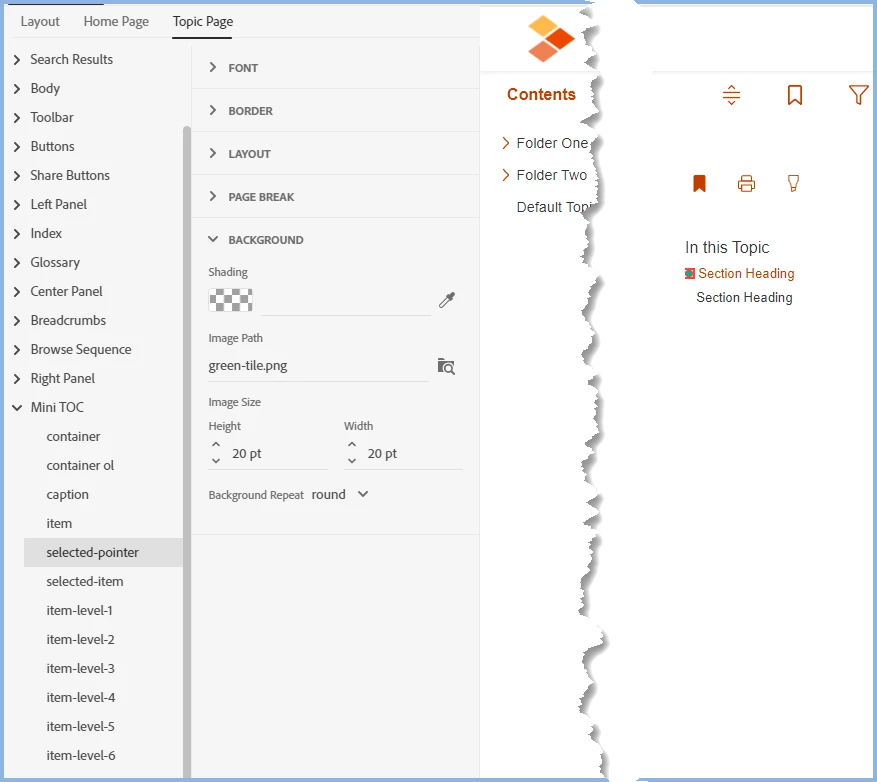
In the Mini TOC, is there a way to change the bullet that's used to mark the current heading? In the attached screen shot, you can see that the bullet is a dark blue. I assume this is coming from the Theme Color for the skin (#00477B in our case). Is there a way to make that bullet a different color without changing the overall theme color (to use an accent color, for example)? Is there a way to use a different indicator altogether?
In the skin settings (Topic Page > Mini TOC), I see something called selected-pointer which seems to be the bullet, but I don't see a way to change the color or the character. (Changing the Font Color for it had no effect in the output.)
I see that there's a file called dot.svg in the /publish/skins/Studio-custom subfolder but it looks black, so I'm guessing that RH applies the theme color to that image when it generates the output. If we created an image file with the bullet we want and called it dot.svg, would that work? Or is there a way to customize this bullet in the Skin Editor?

 AdChoices