
Participant
July 18, 2024
Question

Mini toc items appearing much larger since upgrade to 2022.4.179

  • July 18, 2024
  • 4 replies
  • 298 views

Each month I generate Frameless release notes. The Topic page contains a mini toc on the right hand side; eg:
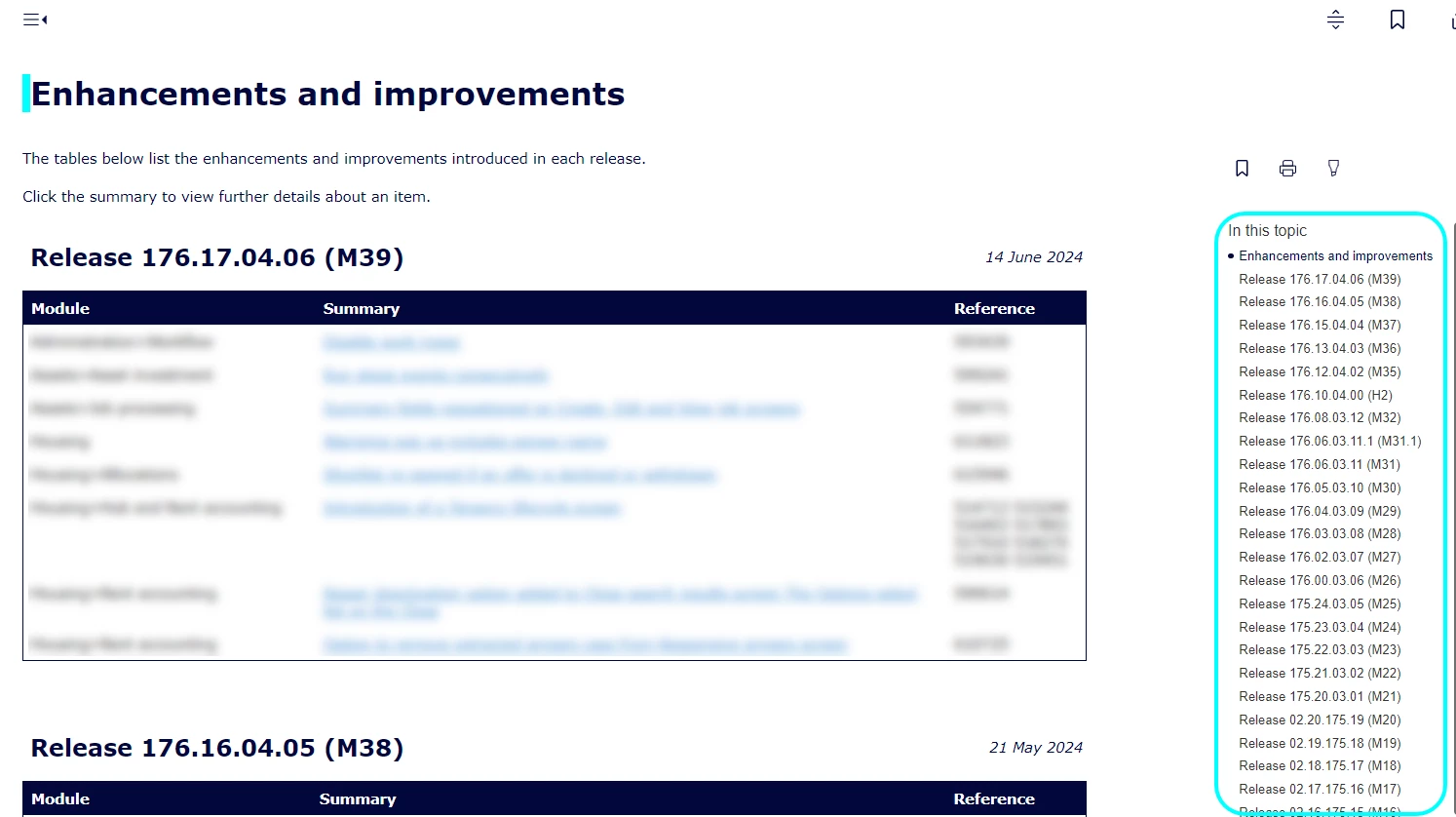


But since upgrading to 2022.4.179 the items in the toc look this this: 
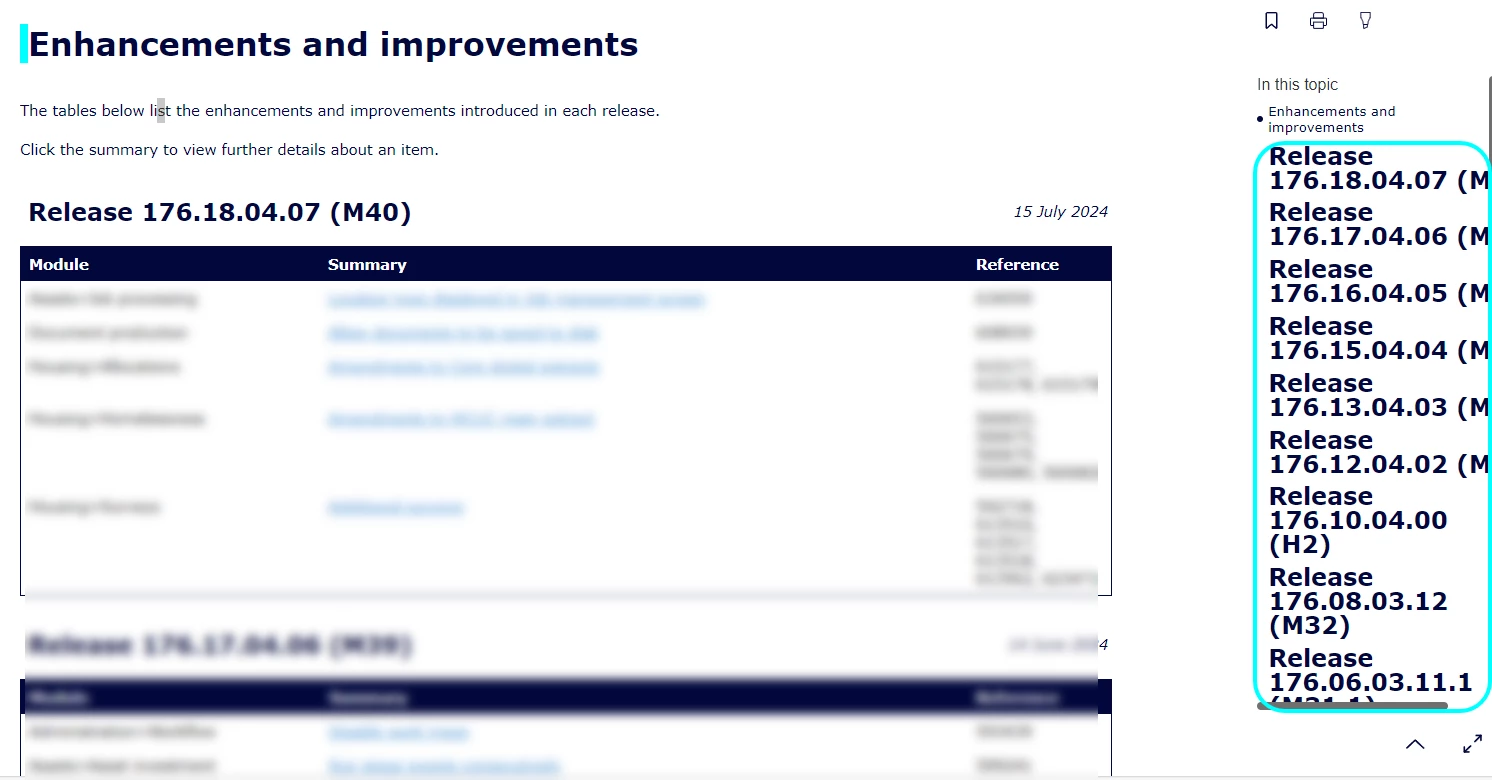
I haven't made any changes to the template and can't find any way to put these back to the size they were.

    This topic has been closed for replies.

    4 replies

    Peter Grainge
    Community Expert
    Community Expert
    July 18, 2024

    Well that's new! :-

    ________________________________________________________

    My site www.grainge.org includes many free Authoring and RoboHelp resources that may be of help.


    Use menu (bottom right) to mark as Best Answer or to Highlight particularly useful replies. Found the answer elsewhere? Share it here.
    Peter Grainge
    Community Expert
    Community Expert
    July 18, 2024

    So a new project with your main project CSS and template does not show the problem, correct?


    Was the problem in the locally generated output or only when you published? If you are not sure, go back and generate again and test both.


    It can happen that the locally generated version is correct from the minute it is generated but the published version on a server takes minutes or sometime a few hours to correct itself. I have seen it on my site when I did make some changes.


    Let us know what happens when you now go back to your main project.

    ________________________________________________________

    My site www.grainge.org includes many free Authoring and RoboHelp resources that may be of help.


    Use menu (bottom right) to mark as Best Answer or to Highlight particularly useful replies. Found the answer elsewhere? Share it here.
    Participant
    July 18, 2024

    I've got it to work now. The headings in the mini toc were all coming from 2 topics where all the data is in tables  including the headings. I split the tables and took the headings out so they were stand alone text and the mini toc worked as expected. Very odd cause they've always been like that but at least it was a simple enough solution.  Thank you for spending time looking at it.

    Peter Grainge
    Community Expert
    Community Expert
    July 18, 2024

    Create a new project with just one topic that has several heading levels. 


    Use the default CSS and the default version of your template. That should be OK. 


    Export the template from your real project and import it into the new one. Still OK?


    Finally import your main CSS. 


    Somewhere along the way the problem should reoccur. Does it? 

    ________________________________________________________
    My site www.grainge.org includes many free Authoring and RoboHelp resources that may be of help.


    Use menu (bottom right) to mark as Best Answer or to Highlight particularly useful replies. Found the answer elsewhere? Share it here.
    Participant
    July 18, 2024

    Tried everything you suggested above and worked fine at every step. This is the one at the end after I'd imported the CSS.


    Peter Grainge
    Community Expert
    Community Expert
    July 18, 2024

    Update 4 did not change the mini toc on my site so it looks like some other change has affected yours.


    Ediing the minitoc is described here in Item 7. It should be easy to fix it. Come back if not.

    ________________________________________________________

    My site www.grainge.org includes many free Authoring and RoboHelp resources that may be of help.


    Use menu (bottom right) to mark as Best Answer or to Highlight particularly useful replies. Found the answer elsewhere? Share it here.
    Participant
    July 18, 2024

    Thanks for the quick response.  I've read the guide you suggested and I changed the font settings but this made no difference - it appears to be using the style from the headings and I obviously don't want to change those.  As I said I didn't change anything between the 2 releases other than adding more topics so not sure what I can edit to fix  the issue.