May 7, 2009
Answered

Missing: Search Tab

  • May 7, 2009
  • 1 reply
  • 5767 views

I'm trying to output a project into a CHM file using RoboHelp 8, and the resulting output completely lacks a Search tab. It's got a Contents tab, an Index tab, and that's it. (The project doesn't have a glossary, so the lack of glossary is no big surprise.) I searched through the forums, and the closest problems I saw were from people whose search tabs "didn't work." However, the fix in that situation (re-registering some DLL files), didn't work for me. I'm hoping someone out there has some insight into how to find a missing search tab. Thanks!
This topic has been closed for replies.
Correct answer RoboWizard

Hi there

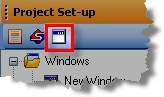
Try this. In RoboHelp, click View > Pods > Project Set-up.

Expand the Windows pseudo-folder.

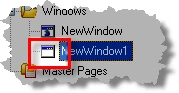
Do you see an icon that looks like this?

If you see that icon (the one with no globe inside) double-click it. If you don't see it, first ensure your Primary Layout type is Microsoft HTML Help. Then click the icon to create a new window.

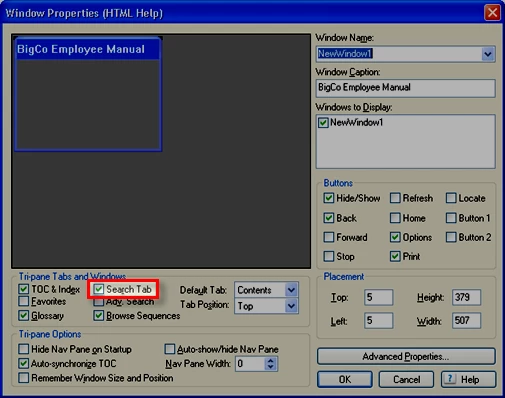
Either way, you should see the Window Properties dialog. You need to ensure the Search Tab is enabled.

Hopefully this helps... Rick

1 reply

RoboWizard
RoboWizardCorrect answer
Inspiring
May 7, 2009

Hi there

Try this. In RoboHelp, click View > Pods > Project Set-up.

Expand the Windows pseudo-folder.

Do you see an icon that looks like this?

If you see that icon (the one with no globe inside) double-click it. If you don't see it, first ensure your Primary Layout type is Microsoft HTML Help. Then click the icon to create a new window.

Either way, you should see the Window Properties dialog. You need to ensure the Search Tab is enabled.

Hopefully this helps... Rick

May 7, 2009

This worked perfectly! Thanks!

Participating Frequently
May 8, 2009

Rick,

So I have a similar, but not so similar problem. I''ve merged two help projects (Child1.chm and Child2.chm). The .chm output looks great (TOC and CSH are fine), except, I'm not getting an Index. I've selected the TOC & Index option in the Windows Properties for the Parent project. By the way, I'm bringing in FrameMaker by reference. So that may be part of the equation.

Any suggestions?

Thanks.

Shawn