
Participating Frequently
November 30, 2010
Question

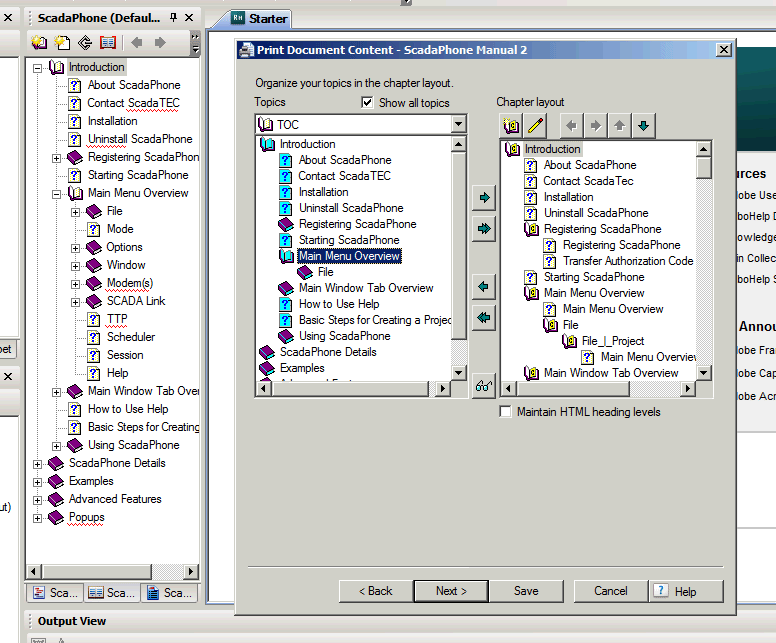
Missing Topics in Topics box
  • November 30, 2010
  • 10 replies
  • 1119 views

As you can see there is a lot of missing subtopics under the Main Menu Overview topic in the left hand Topics Box. These topics all show up in the ,.chm file. Can anyone tell me how to correct this. I can't add the missing topics to the printed doc. If they do not show up in the Topics Box.

I am using RoboHelp HTML version 7.03

Lee

This topic is closed to new replies. Start a new post to keep the conversation going.

10 replies

Captiv8r
Legend
November 30, 2010
Participating Frequently
November 30, 2010

Thanks for your prompt reply Rick.

I have read everything on your site on the subject but I still have no idea why the Topics are missing.

Lee

Captiv8r
Legend
December 1, 2010

Hi Lee

Sorry, the site belongs to fellow Adobe Community Expert Peter Grainge, not me.

Secondly, I think what Peter points out in the page I linked to was that the first time you create Printed Documentation and move through the dialogs, the TOC used *AT THAT TIME* determines the topics. So if you come back later after having added additional topics to the project, you need to take some special steps in order to see those topics reflected in the dialog. That was my thought as to why you weren't seeing them.

I suppose a valid test here would be to right-click the Single Source Layouts pod and create a fresh layout for Printed Documentation. If you try that, do the topics finally appear?

Additionally, do you have more than one TOC defined for the project? If so, have you ensured you pointed to the correct or desired TOC?

Cheers... Rick

Helpful and Handy Links

Begin learning Captivate 5 moments from now! $29.95

Captivate Wish Form/Bug Reporting Form

Adobe Certified Captivate Training

SorcererStone Blog

Captivate eBooks