Inspiring
March 28, 2022
Answered

Modify borders of the text in the topic

  • March 28, 2022
  • 3 replies
  • 504 views

Good morning, I am writing to ask you how I can change the edges, specifically increase the right edges, of the topic. I tried using the Master Page but I failed.

My goal is, once the HTML 5 output is generated, to display the text on the left, leaving a blank space on the right.

Thanks in advance


Elisa

    This topic has been closed for replies.
    Correct answer Peter Grainge

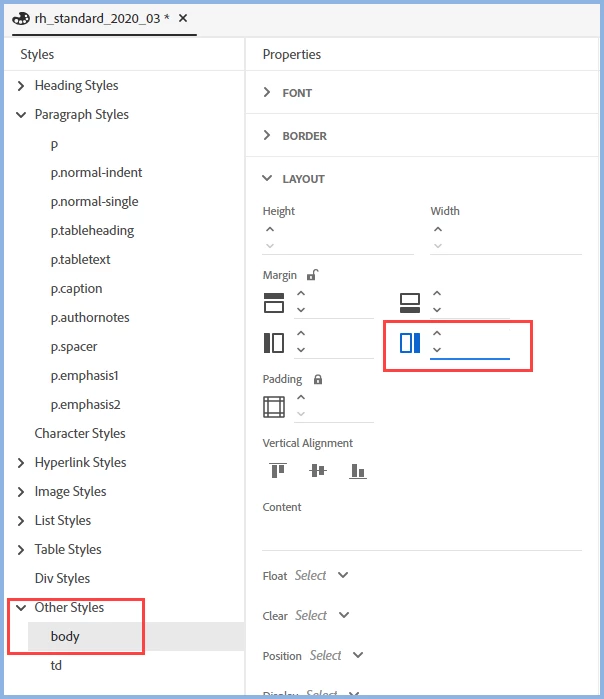
    Open your CSS in RoboHelp's CSS editor and click the Lock symbol so that you see all four margins. Apply whatever size margin you want for the space on the right. That will apply to all the content.


    If you only wanted to apply it to say normal paragraphs, then you would do the same for the style.

    ________________________________________________________

    My site www.grainge.org includes many free Authoring and RoboHelp resources that may be of help.


    3 replies

    Peter Grainge
    Community Expert
    Peter GraingeCommunity ExpertCorrect answer
    Community Expert
    March 28, 2022

    Open your CSS in RoboHelp's CSS editor and click the Lock symbol so that you see all four margins. Apply whatever size margin you want for the space on the right. That will apply to all the content.


    If you only wanted to apply it to say normal paragraphs, then you would do the same for the style.

    ________________________________________________________

    My site www.grainge.org includes many free Authoring and RoboHelp resources that may be of help.


    Use the menu (bottom right) to mark the Best Answer or Highlight particularly useful replies. Found the answer elsewhere? Share it here.
    Inspiring
    March 28, 2022

    Perfect! thank a lot Peter!

    Peter Grainge
    Community Expert
    Community Expert
    March 28, 2022

    OK but have I understood what you want and given you enough information?

    ________________________________________________________

    My site www.grainge.org includes many free Authoring and RoboHelp resources that may be of help.


    Use the menu (bottom right) to mark the Best Answer or Highlight particularly useful replies. Found the answer elsewhere? Share it here.
    Inspiring
    March 28, 2022

    Acctually in part: starting from a project already written, How can I change the margins, as in your example, without having to rewriting everything? I tried from Content Properties but failed.


    The idea of the table borderless is great, I hadn't thought about it!

    Inspiring
    March 28, 2022

    The result I want to achieve is the one shown in the attached figure.

    Peter Grainge
    Community Expert
    Community Expert
    March 28, 2022

    There are gaps in what you have posted to enable me to answer properly.


    You haven't said which version of RoboHelp you are using. Please always start a thread with this information.

    • Please go to Help > About and include the full version number.
    • If you are using 2019 also state whether it is 2019 Classic or 2019 New UI.


    I think what you want is for your text

    to look like this with a gap to the 

    right as I have shown here rather

    than as above. Correct?


    • If you don't want to use that space then apply a right margin to your paragraph style. How depends on your version of RoboHelp.
    • If you do want to use it for something else then you could use a table andtype the text in the left cell of the table. The right cell can then be used for whatever you want. The table can be borderless so it doesn't look like a table.

    ________________________________________________________

    My site www.grainge.org includes many free Authoring and RoboHelp resources that may be of help.


    Use the menu (bottom right) to mark the Best Answer or Highlight particularly useful replies. Found the answer elsewhere? Share it here.
    Inspiring
    March 28, 2022

    Thank you very much Peter. You're right, I forget to insert it every time: my version of Robohelp 2020 is the one indicated in the attached file.