
Inspiring
March 23, 2016
Answered

Monospace fonts in RoboHelp

  • March 23, 2016
  • 1 reply
  • 726 views

Hi all,

I'm somewhat new to RoboHelp and I need your help in managing monospace fonts and different types of fixed spaces in code samples.

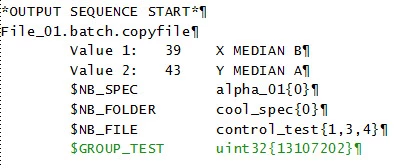
To be more specific: I have several code lines that display wonderful in FrameMaker 10 when set in a monospace font, such as Courier New or Lucida Console, as you can see below:
However, as soon as I import them in RoboHelp 9.0.1.262, it looks like the the fixed character width miraculously vanishes and no matter what other monospace font I use, the result is pretty much the same, i.e. the lines (and "faux columns") are no longer aligned:
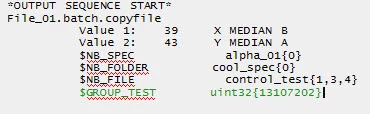
I tried using the Frame object via Insert > HTML > Frame > Frame, but the result is exactly the same.

Moreover, when I try to tweak the space amount by replacing the regular blank "&#160" with (fixed) en-dash spaces " " or hairspaces " " in the HTML source, as shown below

it looks like RH is not able to recognize the codes:
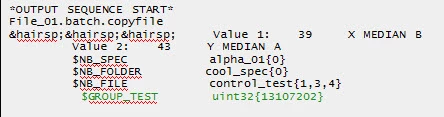
So, did anyone face a similar challenge? Any idea about how to fix this would be more than welcome!

Thanks,

Razvan

This topic has been closed for replies.
Correct answer razlivintz

I tried entering the text manually in RH using the <code> tag, and also with a paragraph style set to use monospace and both seemed to go in okay (without having to manually add &#160;. RH doesn't understand anything much beyond    ). Can you perhaps wrap your text in Framemaker in the html <code> tag, as maybe the spaces are being stripped in the import process, and RH might honour the code tag better?

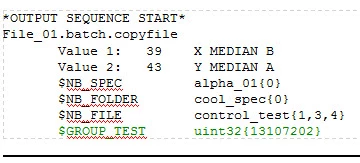
I haven't used Framemaker at all, so these are just thought experiments.  Otherwise, perhaps you can paste fro Framemaker into Notepad and then into the RH topic, assuming there aren't too many code samples needed and that the spaces aren't stripped in the copy paste process.


Amebr,

Thanks for the tip! I've found something even better - the <pre> tag

Actually, it was a two step move:

1. In RH HTML View, I've manually put the code within <pre>... </pre> tags (the blanks are also magically 'normalized'):

2. In the same RH HTML I've "colorized" the line I've needed highlighted by using <font colour=...>, as my character tag is overwritten by the <pre> tags:

The HTML result is this beautifully aligned and highlighted code sample, which, by the way, displays properly in RH Design View too (see the screenshot below). By the way, I have a hunch that this will also nicely publish in PDF

The only problem is that this works for occasional use of code samples. For longer chunks, I guess it would be somewhat cumbersome.

Razvan

1 reply

Peter Grainge
Community Expert
Community Expert
March 23, 2016

Do you mean code that is part of a topic when viewed in Design View or the HTML code when displayed in HTML View?

If the latter, I think you are pretty much tied to Courier and Lucida and at 100% view. I tried many other fonts but those were the only two that were reliable.

Not sure about Design View but I can look if that is what you meant.


See www.grainge.org for RoboHelp and Authoring tips

@petergrainge

Use the menu (bottom right) to mark the Best Answer or Highlight particularly useful replies. Found the answer elsewhere? Share it here.
Inspiring
March 23, 2016

Peter,

Yes, I have a file/topic that has Title Para Para Para [...] then these lines of code inserted as Frame (RH object, that is), in Design View - the two grey screenshots above are taken in Design View.

When switching to HTML View and trying to replace the spaces, in Design View I get the same messy alignment.

And when I actually generate the Webhelp output, it's getting even worse, as all the blanks between my 'faux colums' dissapear (which makes sense, since HTML removes multiple blanks...).


So, is there a fix to this?

Community Expert
March 23, 2016

I tried entering the text manually in RH using the <code> tag, and also with a paragraph style set to use monospace and both seemed to go in okay (without having to manually add &#160;. RH doesn't understand anything much beyond    ). Can you perhaps wrap your text in Framemaker in the html <code> tag, as maybe the spaces are being stripped in the import process, and RH might honour the code tag better?

I haven't used Framemaker at all, so these are just thought experiments.  Otherwise, perhaps you can paste fro Framemaker into Notepad and then into the RH topic, assuming there aren't too many code samples needed and that the spaces aren't stripped in the copy paste process.