Known Participant
March 4, 2024
Answered

Move images and relink - Robohelp 2020.8.34

  • March 4, 2024
  • 7 replies
  • 682 views

Hi,


I am working on an existing help file in Robohelp 2020 and will be adding more topics and images.


All of the current images were saved in same place by the previous user. So they are not organized. I'd like to organize these images into different files. Is there a way to relink them after I've done a reorg?


Thanks,


Julianna

This topic has been closed for replies.
Correct answer Peter Grainge

I have edited your post to put the image inline. Please use the photo icon to insert images within the post. Seeing an image inline with the text makes it easier for anyone answering or viewing the post.


I am not familiar with the Mac OS but that shouldn't matter. to move images you drag within RoboHelp.


Here an image I want to move is in assets/images.
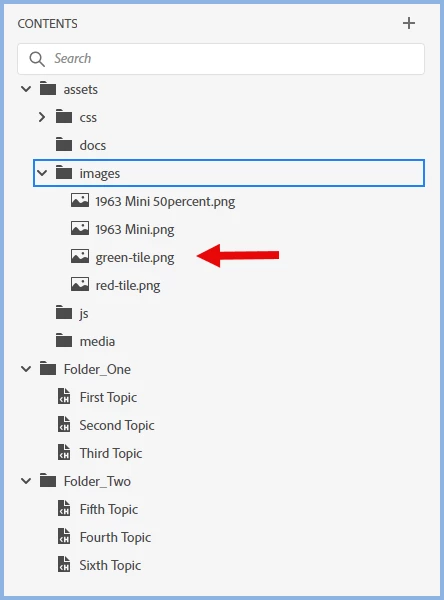


In Windows I would simply click on it and drag it to the required folder.
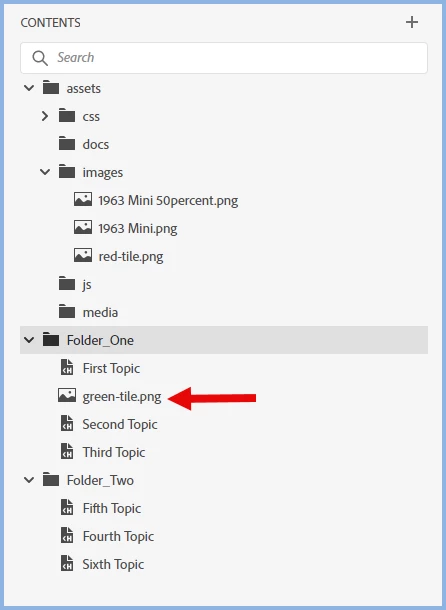


You can multi-select as well.


Does that help?

________________________________________________________

My site www.grainge.org includes many free Authoring and RoboHelp resources that may be of help.


7 replies

Known Participant
March 5, 2024

Hi Peter. 


Very helpful! I am now able to organize the folders. 


Thank you!


Julianna

Peter Grainge
Community Expert
Peter GraingeCommunity ExpertCorrect answer
Community Expert
March 5, 2024

I have edited your post to put the image inline. Please use the photo icon to insert images within the post. Seeing an image inline with the text makes it easier for anyone answering or viewing the post.


I am not familiar with the Mac OS but that shouldn't matter. to move images you drag within RoboHelp.


Here an image I want to move is in assets/images.


In Windows I would simply click on it and drag it to the required folder.


You can multi-select as well.


Does that help?

________________________________________________________

My site www.grainge.org includes many free Authoring and RoboHelp resources that may be of help.


Use menu (bottom right) to mark as Best Answer or to Highlight particularly useful replies. Found the answer elsewhere? Share it here.

Known Participant
March 4, 2024

I attached an image to show where my files are and where I want to move them.


Known Participant
March 4, 2024

Yes, I made the folders before moving the images. 

Known Participant
March 4, 2024

Also, the new folder is under images. Are you saying I need to move the images under Contents instead of assets>images?

Peter Grainge
Community Expert
Community Expert
March 4, 2024

You can create the folders within assets or within Contents. Use the search panel to enter a missing file name. 


You say you moved the files and then created the folders. Folders have to exist to be able to move something. I'm not following what you did. 


I will be logging off shortly as it's late here. I'll pick up in the morning. 

________________________________________________________
My site www.grainge.org includes many free Authoring and RoboHelp resources that may be of help.


Use menu (bottom right) to mark as Best Answer or to Highlight particularly useful replies. Found the answer elsewhere? Share it here.

Known Participant
March 4, 2024

Thanks, Peter,


I moved files that were located in the contents panel under assets>images. I then created a new file folder and moved a couple of the images into it. When I refreshed my Robohelp, the images were no longer there.

Peter Grainge
Community Expert
Community Expert
March 4, 2024

If you move the images within RoboHelp, they will remain linked. Drag them within the Contents panel. 

________________________________________________________
My site www.grainge.org includes many free Authoring and RoboHelp resources that may be of help.


Use menu (bottom right) to mark as Best Answer or to Highlight particularly useful replies. Found the answer elsewhere? Share it here.