
Inspiring
August 27, 2010
Question

Move search input box to minipane below buttons

  • August 27, 2010
  • 1 reply
  • 522 views

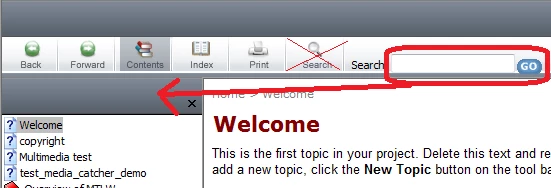
Does anyone know how to move the Search text input field from the main toolbar to the minipane, as indicated by the arrow (I've been messing around in the .skn file but haven't found a solution yet)? I'd also like to remove the search button from the toolbar as I guess the Search and Go buttons do more or less the same job.
Thanks

Paul

This topic has been closed for replies.

1 reply

Peter Grainge
Community Expert
Community Expert
August 27, 2010

You select the toolbar buttons that display in the wizard when you generate the help so you turn off the Search button there. The search field you want to remove is also turned on and off there. If you turn that search field off then when the user clicks Search, they will see a search box. Those are the two options.


See www.grainge.org for RoboHelp and Authoring tips

@petergrainge

Use the menu (bottom right) to mark the Best Answer or Highlight particularly useful replies. Found the answer elsewhere? Share it here.
Inspiring
August 31, 2010

Thanks Peter. If I can't move the search box into the grey area, then I'll have a go at making the grey area a lot smaller, as it otherwise just looks a bit ugly.

Edit to add: I've removed the grey box by following the Skinny on Skins topic: Alter the initial opening height of the toolbar