

Spectrum Writing
Inspiring
October 22, 2019
Answered

Moving entries in a Robohelp 2019 project - output is HTML5

  • October 22, 2019
  • 1 reply
  • 344 views

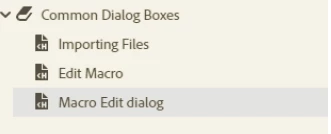
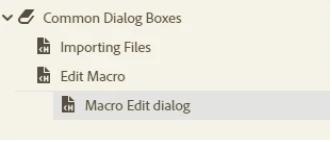
I have a 2019 RH project (Version .9) for which I have created and ordered a TOC. In this TOC, I have a book entry that has three (3) page/topic entries underneath it all at the same level. I want to move the third of these page/topic entries one more position to the right - i.e., indented one place more to the right underneath the 2nd page entry. I right-click on the 3rd page entry, and on the context menu that opens, I click Move > Right , but nada, zip, zilch. The 3rd page entry stays put. Is there a limit for some bizarre reason on indenting/moving TOC page entries? I have attached a screen shot of what I have and what I want, but can't get!


Thanks!


What I have
What I want
This topic has been closed for replies.
Correct answer Peter Grainge

I have edited your post to show the images in the body as it's easier for anyone viewing.


Only books can be indented, not pages within a book. That's how RoboHelp has always worked, it's not a new thing in 2019.


1 reply

Peter Grainge
Community Expert
Peter GraingeCommunity ExpertCorrect answer
Community Expert
October 22, 2019

I have edited your post to show the images in the body as it's easier for anyone viewing.


Only books can be indented, not pages within a book. That's how RoboHelp has always worked, it's not a new thing in 2019.


Use the menu (bottom right) to mark the Best Answer or Highlight particularly useful replies. Found the answer elsewhere? Share it here.
Spectrum Writing
Inspiring
October 22, 2019

Thank you Peter. I am brand spanking new to RH and I come from a Flare and ePub background where this no concept of books and pages in HTML - just nested topics and other than the top-most level topic, you can indent any and all topics to your heart's content. In Flare, this would have been indenting a third-level topic in other words.


Thank you for the prompt reply. I appreciate it.