


Answered
Multilevel List ‘NestedNumbering’ not outputting to Word Document correctly
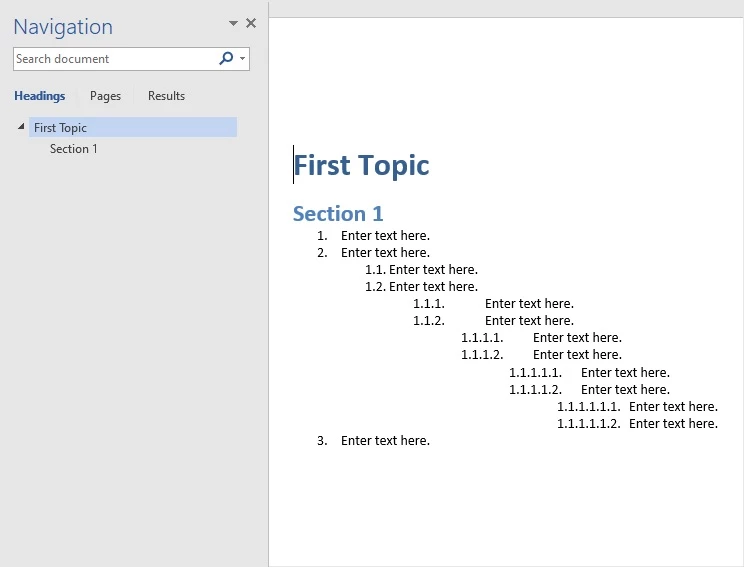
Multilevel nested numbering is not outputting to Word correctly. Numbering starts over at each level but maintains paragraph indentation. Is this is a bug? If not how do you achieve the correct output?
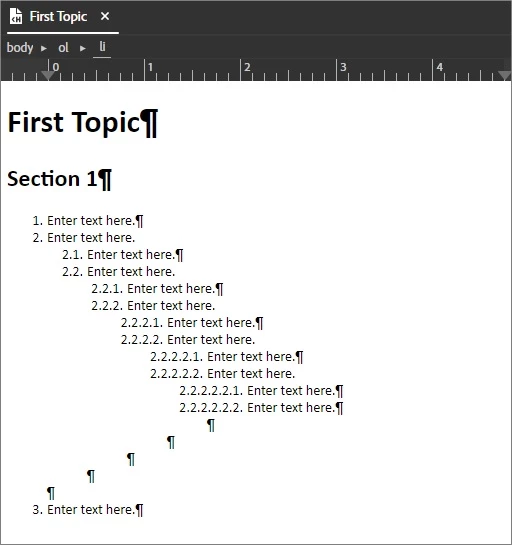
Following example created in a new project with default settings:
Appearance in Robohelp 2022 Update 3:
Output in Word
<?xml version="1.0" encoding="utf-8" ?>
<!DOCTYPE html>
<html xmlns="http://www.w3.org/1999/xhtml">
<head>
  <meta http-equiv="Content-Type" content="text/html; charset=utf-8" />
  <meta name="generator" content="Adobe RoboHelp 2022" />
  <title>First Topic</title>
  <meta name="topic-status" content="Draft" />
  <link rel="stylesheet" type="text/css" href="assets/css/default.css" />
</head>
<body>
  <h1>First Topic</h1>
  <h2>Section 1</h2>
  <ol class="NestedNumbering">
    <li>Enter text here.</li>
    <li>Enter text here.
      <ol>
        <li>Enter text here.</li>
        <li>Enter text here.
          <ol>
            <li>Enter text here.</li>
            <li>Enter text here.
              <ol>
                <li>Enter text here.</li>
                <li>Enter text here.
                  <ol>
                    <li>Enter text here.</li>
                    <li>Enter text here.
                      <ol>
                        <li>Enter text here.</li>
                        <li>Enter text here.</li>
                      </ol>
                    </li>
                  </ol>
                </li>
              </ol>
            </li>
          </ol>
        </li>
      </ol>
    </li>
    <li>Enter text here.</li>
  </ol>
</body>
</html>



 AdChoices